

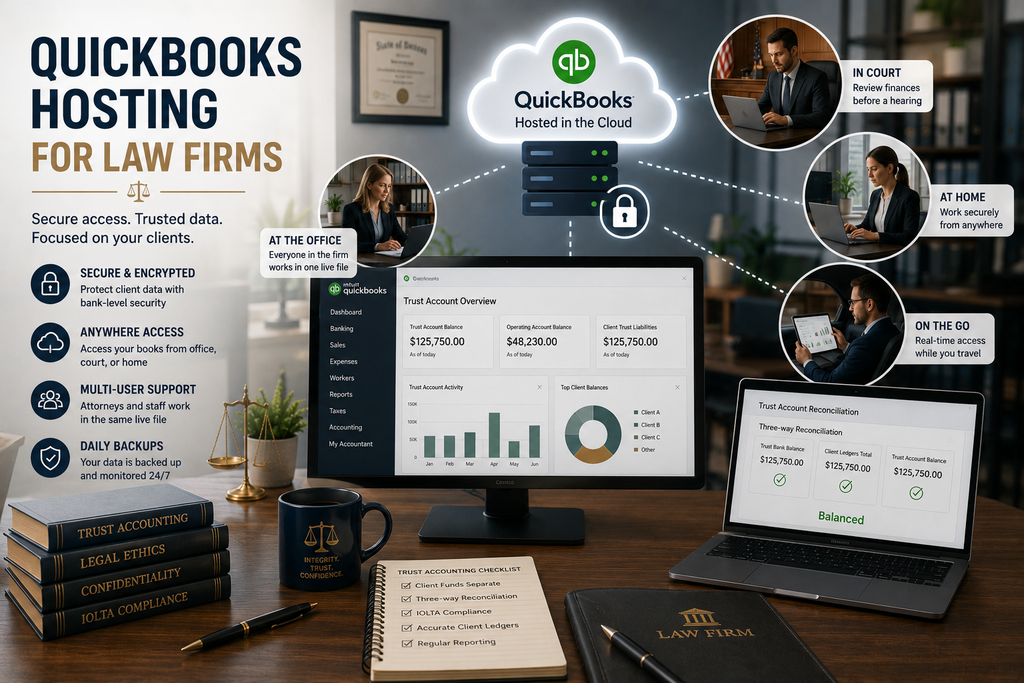
QuickBooks hosting for law firms puts your firm’s books, trust accounting included, on a secure cloud server your attorneys and staff can reach from anywhere. A law practice has two things it cannot get wrong: the accuracy of client trust funds and the confidentiality of client data. Hosting helps with both by running your QuickBooks and any legal add-ons on protected infrastructure, while keeping the file reachable from the office, the courthouse, or home. It does not replace sound trust-accounting practice or your duty to your clients, but it removes the technical friction that gets in the way of both. Here is how it fits a firm.
Trust accounting, kept accurate and separate
Trust accounting lives or dies on separation and reconciliation. Client funds have to stay distinct from the firm’s operating money, every client’s balance has to be tracked to the penny, and the trust ledger, the client ledgers, and the bank statement all have to agree in a three-way reconciliation. QuickBooks, set up correctly and often paired with a legal add-on such as LeanLaw, handles that when the accounts and workflows are built right. Hosting does not change any of it. Your trust bank and liability accounts, your client tracking, and your add-ons all move to the cloud exactly as configured, so the setup your firm relies on carries over untouched. To be clear about the line: QuickBooks is not automatically IOLTA-compliant, and hosting does not make it so. Compliance comes from how you set it up and run it. What hosting gives you is that setup, secured and reachable, without a server in the office.
Getting trust accounting wrong is not a small error. Commingling client funds, overdrawing a client’s trust balance, or a reconciliation that does not tie out are among the fastest ways to draw a bar inquiry, regardless of intent. That is why firms are careful about the setup and cautious about where the data lives. Hosting supports that care by keeping the books backed up, access-controlled, and consistent, so the version you reconcile is the version everyone sees.
Remote access without exposing client data
Attorneys do not work from one desk. A partner reviews numbers before a hearing, a paralegal updates a matter from a second office, and the bookkeeper reconciles from home. Hosting gives all of them one live file reached through a secure login, so nobody emails a company file around or keeps a copy on a laptop that could be lost. That matters for a profession bound by a duty of confidentiality. State bar rules generally permit storing client data in the cloud as long as the firm takes reasonable steps to protect it, and a hosted environment supplies several of those steps: encryption in transit and at rest, multi-factor authentication, a U.S. data center, and managed backups. It does not replace your own security policies or your professional judgment, but it gives you a defensible technical foundation to build them on. You can see how the environment is built on our QuickBooks Desktop hosting page.
Picture a two-attorney firm with a part-time bookkeeper. Before hosting, she drove in to use the one PC with QuickBooks, and trust reconciliations waited on that schedule. Hosted, she reconciles from her home office the same week funds move, the partners check a client balance before a settlement call, and there is only ever one current file. Managed backups and a consistent record of the books also help when it is time for a bar examination or an annual review.
Why CloudTop Office for a law firm
CloudTop Office has hosted accounting software since 2000, has direct access to Intuit Tier-3 support, and supports the legal add-ons and QuickBooks configurations firms use for trust accounting, which most commodity hosts will not touch. More than 500 businesses run their software with us on Microsoft Azure in U.S. regions, with managed daily backups, multi-factor authentication, encryption, and 24/7 U.S.-based support. If your trust accounts or add-ons need review before the move, we can plan that in rather than leaving you to sort it out afterward. For a setup and price built around your attorneys, staff, and add-ons, get a personalized quote.
This article is general information, not legal or compliance advice. Confirm your trust-accounting and data-handling obligations with your state bar and a qualified advisor.
Law firm hosting questions
Can QuickBooks handle law firm trust accounting?
Yes, when it is set up correctly, with separate trust bank and liability accounts, client-level tracking, and three-way reconciliation, and often paired with a legal add-on. It is not automatically IOLTA-compliant, though. Accuracy comes from the setup and how you run it, not the software alone.
Is it safe to keep client financial data in the cloud?
State bar rules generally permit cloud storage when a firm takes reasonable steps to protect the data. Hosting supplies several of those steps, encryption, MFA, a U.S. data center, and backups, while your own policies and access decisions remain yours to set.
Can attorneys access the file from court or home?
Yes. Everyone works from one live file through a secure login, on any device, so partners, paralegals, and your bookkeeper all see current numbers without shipping copies around or working from an out-of-date export.
Will my legal add-ons work when hosted?
Yes. Legal add-ons such as LeanLaw run in the same hosted environment as QuickBooks, so your trust-accounting and billing workflows carry over exactly as they are today.
Does hosting make my firm compliant with trust-accounting rules?
No. Hosting secures and delivers the software. Trust-accounting accuracy, three-way reconciliation, and your state bar obligations remain your firm’s responsibility. Think of hosting as a strong, secure foundation, not a compliance shortcut.
Want secure, anywhere access to your firm’s books?
A 15-minute call is enough to know whether hosting fits your firm, from trust accounting to how your attorneys would work day to day.
Book a 15-min consult
Leave a Reply