
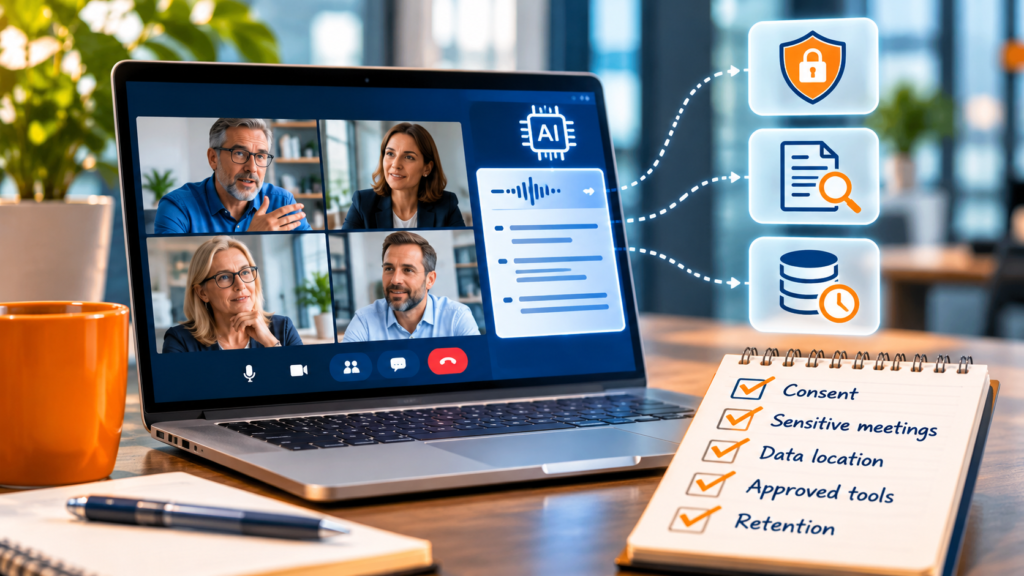
AI note-takers are quietly everywhere now, built into Zoom and Teams, joining calls as bots, or running in the background on someone’s laptop. They are useful, and for a firm that handles client financials they raise a real AI client data privacy question that is easy to miss: the moment a tool records a client meeting, a private conversation becomes a stored recording, a transcript, and an AI summary, often sitting in a third party’s cloud. A meeting transcript feels harmless until it holds a pricing discussion, a client complaint, or an offhand comment about a sensitive matter. This is what a firm should lock down first, before the convenience outruns the control.
Why a meeting transcript is riskier than it looks
One conversation becomes several copies, and they do not all live in the same place. There is the audio recording, the text transcript, and the AI-generated summary, and each can be processed, stored, and shared differently, sometimes by a separate AI provider behind the tool you chose. Some tools have faced lawsuits alleging they recorded conversations without consent in order to train their models, which is a reminder that “where does this go” is not a paranoid question. There is also a quieter risk: a transcript is a written record, and written records are discoverable. A casual remark in a client call that once lived only in memory now exists as searchable text a firm may have to produce later. None of this means AI notes are off-limits. It means the data trail behind them is worth understanding before you press record.
What to lock down first
You do not need to solve everything at once. These are the controls that reduce the most risk for the least effort, in order.
The consent trap
Consent is where good intentions go wrong. Federal law allows one-party consent to record, but a number of states require all participants to agree, and an AI bot that joins a meeting and starts recording without announcing itself can run afoul of those laws regardless of whether the host consented. The trap deepens with tools that capture audio directly from a computer without ever appearing as a participant, which makes it easy to record a client without anyone in the room deciding to. And it runs both ways: a client might bring their own note-taker to a meeting with you. The practical answer is not to ban the technology, but to make consent explicit, know your state’s rules, and treat a silent, auto-joining bot as the risk it is. For a deeper look at the professional-ethics side, this analysis of AI notetakers in client meetings is a useful reference.
Where hosting fits
Hosting sits on one corner of this, and it helps to be clear about which. When your accounting software and client records run in a hosted environment, that data lives in one access-controlled, backed-up place and gives you a documentable service provider for your WISP, which matters when you are accounting for every tool that touches client information. What hosting does not do is stop a note-taker from joining a video call or write your consent policy. Those controls live with your firm. The through-line across all of this, the AI tools you run, the data you host, the meetings you record, is the same: know where client data goes, and decide the rules before the tools decide for you. We cover the policy side in our guide to a practical firm AI policy, and the broader exposure in our note on the security risk behind AI tools.
This article is general information, not legal or compliance advice. Recording-consent laws vary by state and change; confirm your obligations with a qualified advisor.
AI meeting notes and privacy questions
Are AI meeting notes a privacy risk?
They can be. A meeting produces an audio recording, a transcript, and a summary, often stored by a third-party vendor and sometimes used to train models. For client conversations about finances or sensitive matters, that is data leaving your control, which is the risk to manage.
Do I need consent to record a client meeting?
Often, yes. Recording-consent laws vary by state, and some require all participants to agree. An AI bot that joins and records without announcing itself can violate those laws regardless of the host’s consent, so check your state’s rules and make consent explicit.
What should a firm lock down first?
Consent and which meetings get recorded. Set a rule that sensitive client meetings are not auto-recorded, confirm consent where it is required, and verify where the transcripts go before you rely on any tool. Those two steps remove most of the risk.
Does hosting help with AI meeting-note risk?
Hosting keeps your accounting data in a controlled place and gives you a documentable vendor, but it does not stop a note-taker from joining a call or write your policy. The controls on consent, approved tools, and retention are the fix; hosting supports the data side around them.
Want client data in one controlled place as AI tools multiply?
A 15-minute call is enough to talk through keeping your accounting data secured and documented while your firm sets its AI rules.
Book a 15-min consult
Leave a Reply