

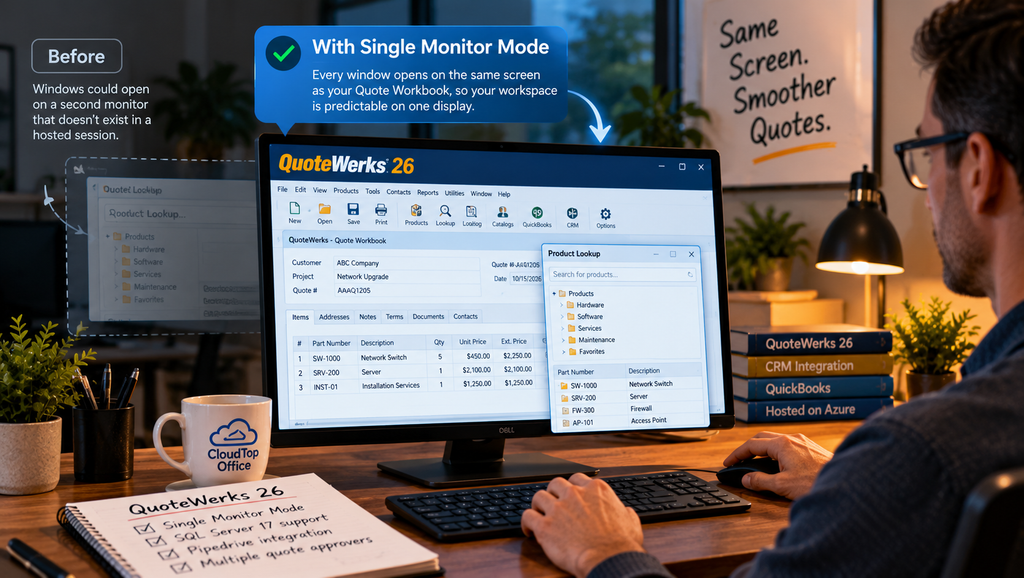
QuoteWerks 26 added Single Monitor Mode, a setting that keeps every QuoteWerks window on the same screen as the main Quote Workbook instead of letting them open on another monitor. QuoteWerks built it partly for people working in remote or virtual environments on a single display, which is how most hosted QuoteWerks users work day to day. If you run QuoteWerks in a hosted setup, this is a small change that removes a recurring annoyance. What it does is simple; where it matters depends on how you run QuoteWerks.
What Single Monitor Mode does
In earlier versions, QuoteWerks could open a child window, a lookup, a product search, a dialog, on a different monitor than the one you were working on. On a multi-monitor desk that was mostly harmless. In a remote or virtual session with a single display, it was not, because a window set to appear on a “second monitor” that does not exist can end up off-screen or awkwardly placed. Single Monitor Mode fixes that by keeping each window on the same screen as the window that opened it. The workspace stays where you can see it, every time. It is an optional setting, so you can switch it on if windows have been wandering and leave it off if your current layout already works.
Why it matters more in a hosted setup
Hosted and virtual sessions usually present a single display, even when your physical desk has several monitors, because you are looking at one remote screen. That is the exact situation QuoteWerks pointed to when it described the feature. Without Single Monitor Mode, a window configured for a second monitor had nowhere sensible to go, and users would lose a dialog behind the main window or off the edge of the session. With it, that stops happening. In practice, a rep clicks a product lookup and it appears in front of them, instead of opening somewhere off the visible screen. If you work in hosted QuoteWerks every day, the benefit is less about a new capability and more about a steady, predictable workspace, which is the kind of thing you notice by its absence once it is fixed.
The rest of QuoteWerks 26 worth noting
Single Monitor Mode is one line on a longer list. QuoteWerks 26 also added support for Microsoft SQL Server 17, accounting integration enhancements, a Pipedrive integration, advanced sales tax handling, and support for multiple quote approvers, among other changes. Most of the release is about fitting QuoteWerks into current systems rather than adding flash, which tends to matter more to teams that use it every day. We covered the full release in our overview of what is new in QuoteWerks Version 26.
Running QuoteWerks 26 in a hosted environment
If you want QuoteWerks 26 and its features on a cloud server your team reaches from anywhere, that is what CloudTop Office does. We have been named a Top 10 QuoteWerks Solution Partner worldwide every year since 2019, and we have run QuoteWerks with a CRM and QuickBooks in-house since 2008, so we know the product past its feature list. Your QuoteWerks runs on Microsoft Azure in U.S. regions with managed daily backups, multi-factor authentication, encryption, and 24/7 U.S.-based support. See how it works on our QuoteWerks hosting page, or get a personalized quote for your team.
QuoteWerks Single Monitor Mode questions
What is Single Monitor Mode in QuoteWerks 26?
A setting that keeps all QuoteWerks windows on the same screen as the main Quote Workbook, rather than letting them open on another monitor. QuoteWerks added it in Version 26, and it is aimed at single-display and remote setups.
Why does it matter for remote or hosted users?
Hosted and virtual sessions often present a single display, where a window set to appear on a second monitor can land off-screen. Single Monitor Mode keeps everything on the screen you are actually using, which makes a hosted workspace more predictable.
Do I need it if I use multiple monitors locally?
Not necessarily. It is optional and mainly helps single-display and remote sessions. Some multi-monitor users turn it on anyway because they prefer windows staying put, but it is not required if your current layout works for you.
Is Single Monitor Mode available in QuoteWerks Web?
It is a QuoteWerks Desktop setting. QuoteWerks Web runs in a browser, where window placement works differently, so the setting applies to the Desktop product, including when you run it in a hosted environment.
What else is in QuoteWerks 26?
Support for Microsoft SQL Server 17, accounting integration enhancements, a Pipedrive integration, advanced sales tax handling, and multiple quote approvers, among other changes. Our QuoteWerks Version 26 overview covers the full list.
Thinking about running QuoteWerks 26 hosted?
A 15-minute call is enough to see how hosted QuoteWerks Desktop would work for your team, Single Monitor Mode and all.
Book a 15-min consult
Leave a Reply