

The 2026 QuickBooks Desktop price increase has firms asking a fair question: now that renewals cost more, is it cheaper to host QuickBooks or to stay put? The honest starting point is that hosting is an added cost on top of your license, not a replacement for it, so hosting by itself is never cheaper than the renewal alone. The comparison that matters is the full cost of each path: renewing Desktop and running it on your own server, renewing and hosting it, or switching to QuickBooks Online. This is a plain look at what each one actually costs, without pushing you toward any of them.
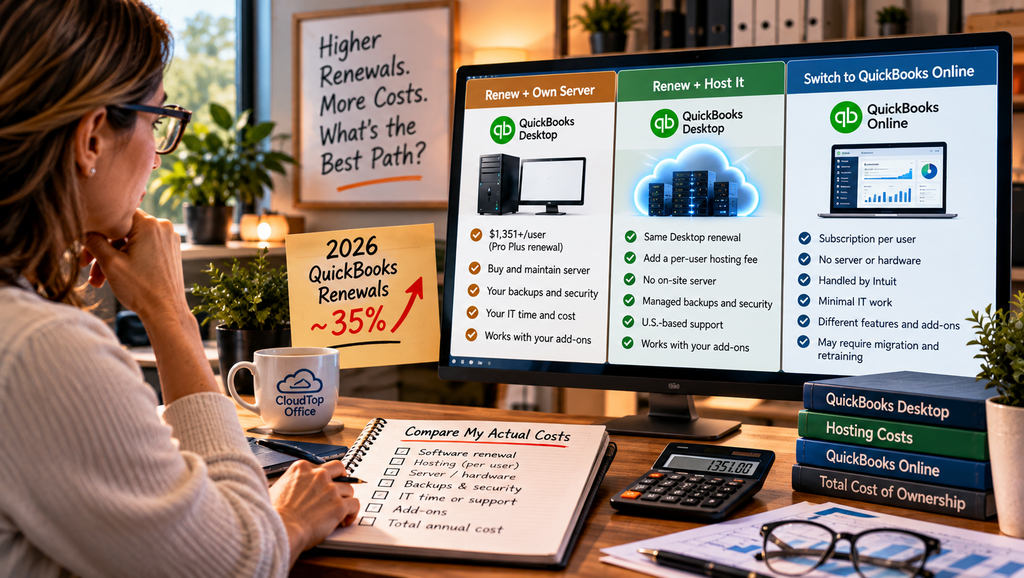
What the 2026 QuickBooks Desktop price increase changed
Intuit raised Desktop renewal prices twice in 2026. A single-user Pro Plus subscription reached about $1,351 per year as of October 1, up from $999, which works out to roughly a 35% increase over the year. Premier and Enterprise sit higher still. The renewal is now a recurring annual cost that climbs, on a product that will not gain new versions, so the yearly bill is worth planning around rather than absorbing by habit. These are Intuit’s published figures, and they change, so confirm the current numbers for your edition before you budget.
The three paths, side by side
Rather than a single dollar figure, which varies by firm, the table below shows where the costs actually sit for each option.
What “staying” really costs
The renewal is the number most firms focus on, because it is the one on the invoice. It is only one line of several. Keeping Desktop on your own server also means buying and eventually replacing that hardware, paying for Windows Server licensing, handling backups and testing that they restore, patching the operating system, and spending IT time, your own or someone you pay, to keep it all running. None of that shows up next to the $1,351, but all of it is part of staying. When people compare hosting to “just renewing,” they often leave these costs out, which makes the renewal look cheaper than the real total.
What hosting adds to the cost
Hosting adds a per-user fee on top of your Desktop renewal. In exchange, several of the costs above move off your plate: the server and its replacement cycle, the backups, the patching, and the IT time, along with built-in remote access. Whether the total comes out lower than self-hosting depends on how much you currently spend keeping your own server alive and how many users you have. For a firm already paying for a server, IT support, and a backup service, hosting can land close to or below the all-in cost of doing it yourself. For a firm running Desktop on a single workstation with no real backup, hosting is likely an added expense that buys security and access it did not have before. Both can be reasonable outcomes, which is why the answer depends on your numbers.
What about QuickBooks Online?
A third path is to leave Desktop and switch to QuickBooks Online. It is a different, lighter product, not a cheaper version of what you already run. The per-user subscription can look lower on paper, but you give up Desktop’s depth, including the add-ons and reporting many firms rely on, and you take on a migration and some retraining. For a firm that depends on Desktop features, a lower seat price is not really a saving, because you are buying something that does less. Whether it fits is a decision about the software, not the sticker price, and our guide on hosted QuickBooks versus QuickBooks Online covers that comparison in more detail.
So which is cheaper?
It depends on your setup, and the price increase alone does not settle it. What the increase does is narrow the gap, because the renewal you would pay either way is now larger, which makes the added hosting fee a smaller share of the total. If you need Desktop and already run a server, hosting is worth pricing against your real cost of ownership rather than against the renewal alone. If your books are simple enough that you would not miss Desktop’s features, QuickBooks Online is worth a look, though that is a decision about the software, not just the price. The only way to know which is lowest for your firm is to put the actual numbers side by side. Our QuickBooks Desktop hosting page explains what is included, and a quote gives you the hosting figure to compare.
Price and hosting questions
How much did QuickBooks Desktop go up in 2026?
A single-user Pro Plus subscription rose to about $1,351 per year as of October 1, up from $999, which is roughly a 35% increase over the year after two separate increases. Premier and Enterprise are higher. These are Intuit’s published figures, so confirm the current numbers for your edition.
Is hosting cheaper than renewing Desktop?
Hosting is an added cost on top of your license, not a replacement, so it is not cheaper than the renewal by itself. It can be competitive once you count the full cost of running your own server, which is where the honest comparison lives.
What does staying on Desktop actually cost?
The renewal, plus whatever you spend running it: server hardware, Windows Server licensing, backups and restore testing, patching, IT time, and replacing the hardware every few years. Those costs are easy to leave out and add up.
Would switching to QuickBooks Online cost less?
On a per-user basis, sometimes, but it is a different, lighter product, not a cheaper version of Desktop. You trade Desktop’s depth and add-ons, and there is a migration and retraining cost. Compare the features alongside the price, not the seat price on its own.
How do I compare the real numbers for my firm?
Hosting is priced per user and varies with your setup, so a quote based on your users and add-ons gives you the figure to set against renewing and self-hosting. That side-by-side is the only way to know which is lowest for you.
Want the real numbers for your firm?
A 15-minute call is enough to compare renewing and self-hosting against hosting, using your actual user count and setup.
Book a 15-min consult
Leave a Reply