

Comparing Intuit Enterprise Suite vs hosted QuickBooks Desktop sounds like picking between two versions of the same thing. They are not. One is a new cloud platform built for mid-market businesses juggling several legal entities. The other is the QuickBooks Desktop you already run, kept as it is and moved to a cloud server. They solve different problems, so the useful question is which problem you have, not which product is better. The two profiles below are a quick way to see where you fall.
What Intuit Enterprise Suite is
Intuit Enterprise Suite is a cloud-based platform built on QuickBooks Online’s infrastructure, and a separate product from both QuickBooks Online and QuickBooks Desktop Enterprise. Intuit aims it at mid-market businesses, roughly $5 million to $250 million in revenue, that have outgrown QuickBooks but do not want a full ERP project. It tends to land with service-based, project-based, and construction companies that have pushed past what QuickBooks Online Advanced can hold. Its clearest strength is multi-entity work: a single login that can manage many entities, intercompany eliminations that post automatically, and consolidated financial statements that assemble in real time instead of in a spreadsheet someone maintains by hand. It adds multi-dimensional reporting, integrated payroll and HR, business intelligence, and AI-assisted automation on top.
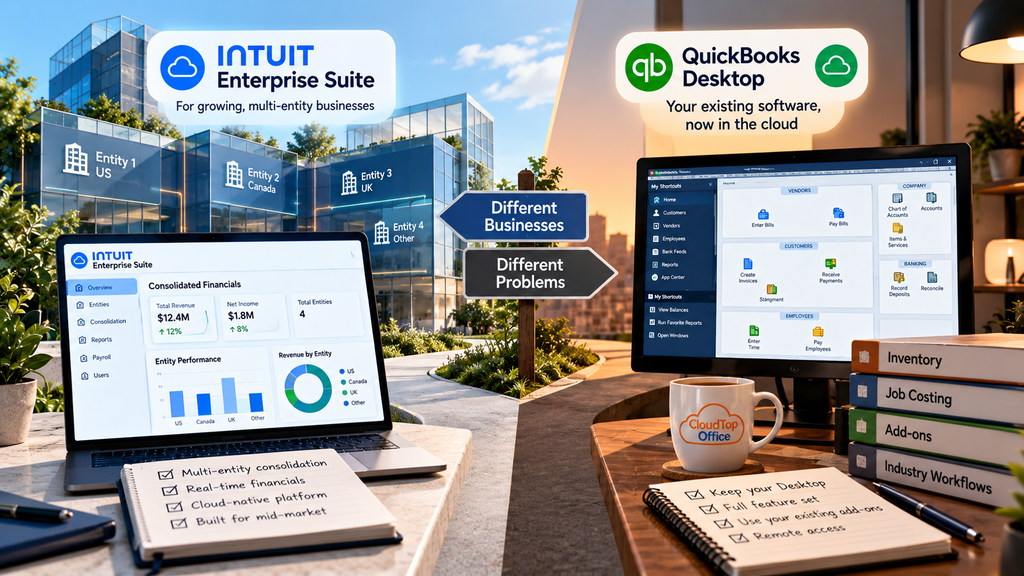
One honest limitation is worth naming, because it decides a lot of cases: Intuit Enterprise Suite is light on inventory. A business that leans on Desktop’s advanced inventory would lose that depth in the move. And it is a move. Adopting Intuit Enterprise Suite means migrating to a new, cloud-native product and learning it, which is the right trade for some firms and the wrong one for others.
What hosted QuickBooks Desktop is
Hosted QuickBooks Desktop is a different idea entirely. It is your existing QuickBooks Desktop or Enterprise, unchanged, running on a managed cloud server your team reaches from any device. You keep the full feature set, your add-ons, and the workflows you already know, and you gain remote access and managed infrastructure without switching products or converting data. It is not a multi-entity cloud platform, and it is not trying to be. It is the same software you run today, in a place everyone can reach. For firms whose reason for looking was mainly remote access, or retiring an aging office server, that is usually the shorter path. A contractor running job costing with an inventory add-on, or a distributor leaning on advanced inventory, is the classic case: those workflows live in Desktop and do not yet have a clean home in a cloud platform.
Cost sits on a different tier as well. Intuit Enterprise Suite is priced for the mid-market, and multi-entity organizations often look at $12,000 to $15,000 a year or more. Hosting your existing Desktop is a different kind of spend, your current license plus a per-user hosting fee, which for a small or midsize firm usually lands well below a mid-market platform. If budget is part of the decision, the two are not the same scale.
The questions that actually decide it
A few plain questions settle most of these comparisons.
- Do you manage multiple legal entities and spend real time consolidating their books? That is the problem Intuit Enterprise Suite was built to solve, and it does it well.
- Do you rely on Desktop’s inventory, job costing, or specific add-ons? Those do not carry over to Intuit Enterprise Suite, which is a strong reason some firms keep Desktop.
- Are you ready to migrate to a new platform and retrain your team, or would you rather keep what you have? Intuit Enterprise Suite is a switch. Hosting is not.
- Was remote access the whole reason you started looking? If so, hosting your current Desktop may answer the question without any product change at all.
If multi-entity consolidation is your real bottleneck, Intuit Enterprise Suite is worth evaluating on its own terms, and an Intuit reseller can show you whether it fits. If your reason for looking was keeping the Desktop you rely on while gaining remote access, hosting does that without the migration. Our QuickBooks Desktop hosting page explains how that side works.
Want to keep the QuickBooks Desktop you know, from anywhere?
A 15-minute call is enough to see what hosting your current Desktop setup would look like for your team.
Book a 15-min consult
Leave a Reply