

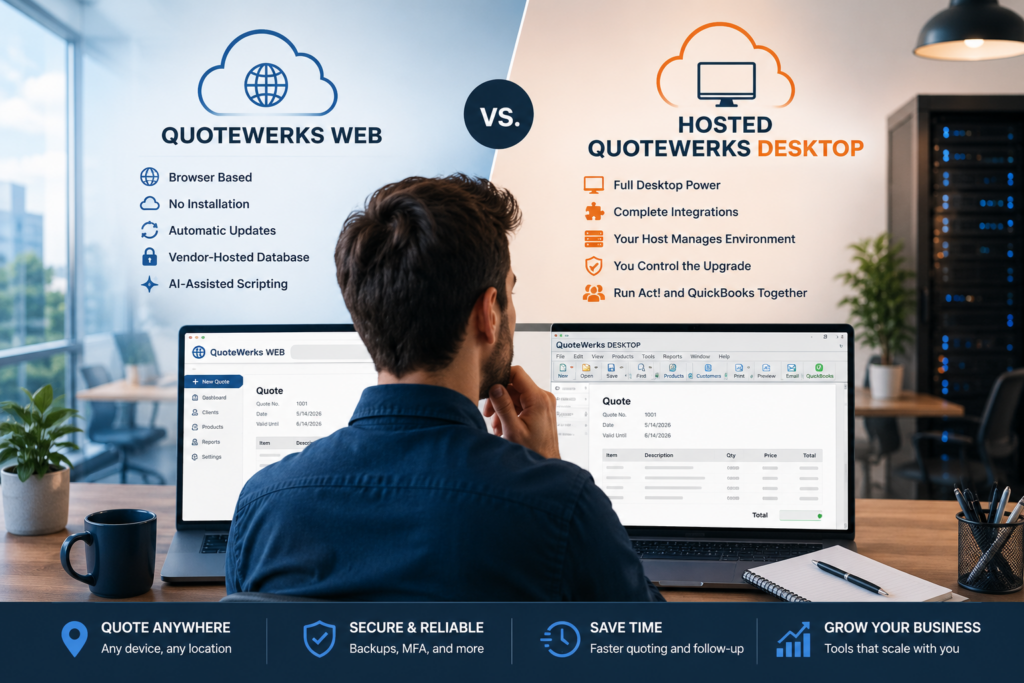
QuoteWerks Web and hosted QuoteWerks Desktop both let your sales team quote from anywhere, but they get there in different ways. QuoteWerks Web is the vendor’s browser-based product, hosted for you and updated automatically. Hosted QuoteWerks Desktop is the full Desktop application run on a managed cloud server, so you keep every feature and integration while gaining that same anywhere access. The two have converged a lot in the past couple of years, so the real question is how deep your quoting setup goes and what it connects to. Here is an even-handed comparison and a simple way to decide.
QuoteWerks Web and hosted Desktop, side by side
QuoteWerks reports that its Web product has reached feature parity with Desktop for the core quoting workflows most teams use every day, with some advanced and edge-case features still arriving. This comparison looks different than it would have a couple of years ago: Web began as a browser companion to Desktop and has grown into a product that can stand on its own for everyday quoting, which is why the choice is now about fit rather than raw capability. Here is how the two options line up.
Where each one pulls ahead
QuoteWerks Web is genuinely strong now, and it deserves a fair hearing. Because it runs in the browser and the vendor hosts the database, there is nothing to install and no SQL server to maintain, updates happen on their own, and new users get going quickly. It also has a few Web-only touches, like AI-assisted scripting for automations. For a lean team whose needs sit inside core quoting, that simplicity is hard to beat.
Hosted Desktop pulls ahead when your quoting reaches past the basics. You get the complete feature set today rather than waiting for parity, full SDK and external integrations, and the native QuickBooks Desktop accounting integration in the same place. The part that surprises people is access: hosting puts the full Desktop client on a cloud server you reach from any device, so you get browser-style anywhere access without stepping down to a lighter product. And you can run QuoteWerks alongside Act! and QuickBooks in one hosted workspace, which the web product does not do.
The honest bottom line: if your quoting is straightforward and you value simplicity, QuoteWerks Web is a fine home. If it is deep, heavily integrated, or tied to QuickBooks Desktop, hosted Desktop keeps everything intact while still freeing your team from the office. Neither choice locks you in, since the two can run side by side.
Which fits your sales team?
You can also run both
It is not strictly either-or. QuoteWerks supports a hybrid setup where your team quotes in the browser through Web while Desktop handles administrative tasks like report modification, procurement, and the QuickBooks Desktop integration. That is a sensible path for teams mid-transition or with mixed roles, and CloudTop can host the Desktop side of a hybrid arrangement so that piece is still reachable from anywhere. If you are unsure which way to lean, our QuoteWerks consulting team can look at your integrations and workflows and give you a straight recommendation. Because your data and quotes live in QuoteWerks either way, moving between Web, Desktop, or a hybrid mix later is a change of deployment, not a rebuild.
Hosting the full Desktop, from anywhere
CloudTop Office has hosted QuoteWerks for years and runs QuoteWerks with Act! and QuickBooks in-house, so we know the product past the sales page. If hosted Desktop is your fit, we put the complete QuoteWerks Desktop on Microsoft Azure in U.S. regions with managed daily backups, multi-factor authentication, encryption, and 24/7 U.S.-based support, and we can bring your CRM and accounting into the same environment. To see a setup and price built around your team, get a personalized quote.
Web vs Desktop, sorted
Is QuoteWerks Web as capable as Desktop now?
For core quoting, close. QuoteWerks reports parity on the everyday workflows most teams use, with some advanced and edge-case features still arriving on Web. Desktop still leads on deep customization, the SDK, procurement, and the QuickBooks Desktop integration.
Can I use the QuickBooks Desktop integration with QuoteWerks Web?
The QuickBooks Desktop accounting integration runs on the Desktop side. In a hybrid setup you quote in Web and use Desktop for that link. Hosted Desktop keeps quoting and the QuickBooks Desktop integration together in one environment.
Does hosted Desktop give me browser-style anywhere access?
Yes. Hosting puts the full Desktop client on a cloud server you reach from any device, so you get anywhere access without moving to the lighter web product. It is the way to keep the complete feature set and still work from anywhere.
Do I have to choose one or the other?
No. QuoteWerks supports running Web and Desktop together in a hybrid setup, with Web for day-to-day quoting and Desktop for admin tasks and the QuickBooks Desktop integration. CloudTop can host the Desktop side so it is reachable from anywhere.
Does either option need a SQL server I manage?
No. QuoteWerks Web hosts the database for you, and with hosted Desktop your host runs the database, so there is no SQL server for you to maintain either way.
Leave a Reply