

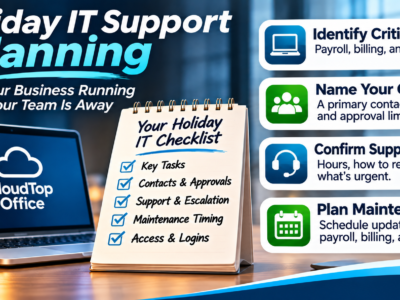
Holiday IT support planning is the difference between a quiet week off and a scramble when something breaks and the one person who knows how to fix it is away. When staff take time off, the goal is simple: make sure the business tasks that can’t wait keep moving, and that whoever is in the office knows how to get help. The way to get there isn’t to hope nothing goes wrong. It’s to agree a few things with your managed IT provider before the break, who can request and approve help, when support is available, and how an urgent issue gets escalated. This guide walks through what to settle, and ends with a short handoff checklist your office manager can use.
The Short Version
- List the tasks that can’t pause, such as payroll, billing, and client access.
- Name a primary contact and a backup, and agree what each can approve.
- Agree to support hours, how to reach help, and what counts as urgent, with your provider.
- Schedule any maintenance away from payroll, billing, and deadlines.
- Hand the office manager a short checklist, so nothing depends on one person’s memory.
Which Business Tasks Must Keep Moving?
Start by listing what can’t wait. Payroll runs on its date whether or not your bookkeeper is in. Invoices and billing keep the business paid. Client or customer access to your systems can’t go dark. Email and the business apps your team works in, including anything you host in the cloud, have to stay reachable. Write down the handful of tasks that would actually hurt if they stopped for a day or two over the break, and be honest about which ones those are. That short list is what your coverage plan protects. Everything else can usually wait until people are back, and knowing the difference keeps a small glitch from being treated like an emergency.
Name a Primary Contact, a Backup, and Approval Limits
Most support delays over a holiday come down to one question: who do I call, and are they allowed to say yes? So name a primary contact who can request help from your MSP, and a backup for when that person is off too. Just as important, agree what each of them can approve on their own, and what has to wait for you. A password reset or a stuck printer is one thing. Approving a change that costs money or touches sensitive data is another. Spelling out those limits in advance lets your office manager act on the small stuff without guessing, while knowing exactly which decisions to hold for the owner. That clarity is what keeps things moving without anyone overstepping.
Agree to Support Hours, Escalation Routes, and What Counts as Urgent
Don’t assume holiday support looks like a normal Tuesday. Agree with your provider what hours support runs over the break, how to reach them, and what response you can expect, rather than finding out when you need them. Then define “urgent” together, because not everything is. A server down that stops the whole office, or a payroll run that won’t process, is urgent. A cosmetic glitch can wait. Agree the escalation route for the genuine emergencies, who gets contacted and how, so a real problem reaches the right person quickly and a minor one doesn’t pull someone off their holiday for no reason. The point of agreeing this in advance is that nobody has to improvise a judgment call on December 27.
Plan Maintenance Around Payroll, Billing, and Deadlines
The quiet of a holiday can look like a good time for IT maintenance, and sometimes it is, but only when it’s planned around your deadlines. Give your provider your calendar: when payroll runs, when billing goes out, when a month-end or quarter-end close lands. Then agree that routine maintenance happens away from those windows, so an update never takes a system offline the morning payroll is due. If maintenance does need to run during the break, agree when it happens and who confirms afterward that your key systems and apps came back up and are working. For more on how updates should be scheduled and tested in general, see our guide to patch management for small business.
A Short Handoff Checklist For The Office Manager
Pull it together into one note the covering staff can rely on. Confirm each of these before the break.
Where CloudTop Office Fits
Holiday coverage works best when it’s agreed in advance, not improvised on the day. Talk with CloudTop Office about managed IT support and what coverage makes sense for your business, so the tasks that can’t wait keep moving and your office manager knows exactly how to get help while the usual contact is away. What’s included, and how support runs over a holiday, is something to agree together and match to your needs.
Frequently asked questions
What is holiday IT support planning?
It’s agreeing, before staff take time off, how IT will be covered: which tasks must keep running, who can request and approve help, when support is available, and how an urgent problem gets escalated. The aim is that essential work continues while the usual contact is away.
Who should be the holiday IT contact?
Name a primary contact who can request help from your provider, and a backup for when that person is also off. Agree what each can approve on their own, so routine fixes move quickly and bigger decisions still wait for the owner.
What counts as an urgent IT issue over a holiday?
Agree the definition with your provider, but typically it’s anything that stops essential work, such as a server down for the whole office or a payroll run that won’t process. A cosmetic glitch or a non-blocking issue can usually wait until people are back.
Should IT maintenance happen during the holidays?
It can, if it’s planned around your deadlines. Give your provider your payroll, billing, and close dates, and agree that maintenance runs away from those windows, with a check afterward that your key systems came back up.
Plan your holiday coverage
A little planning now means a calm break later. Tell us how your team works and what can’t pause, and we’ll help you agree the coverage, contacts, and escalation that fit your business. Discuss managed IT support with CloudTop Office.
CloudTop Office provides managed IT support and hosts the business software companies rely on. Our sister brand, CloudTop SaaS, cloud-hosts Windows business software.
 Sage 50 Crashing After Windows Updates? What to Tell Your MSP
Leave a Reply