

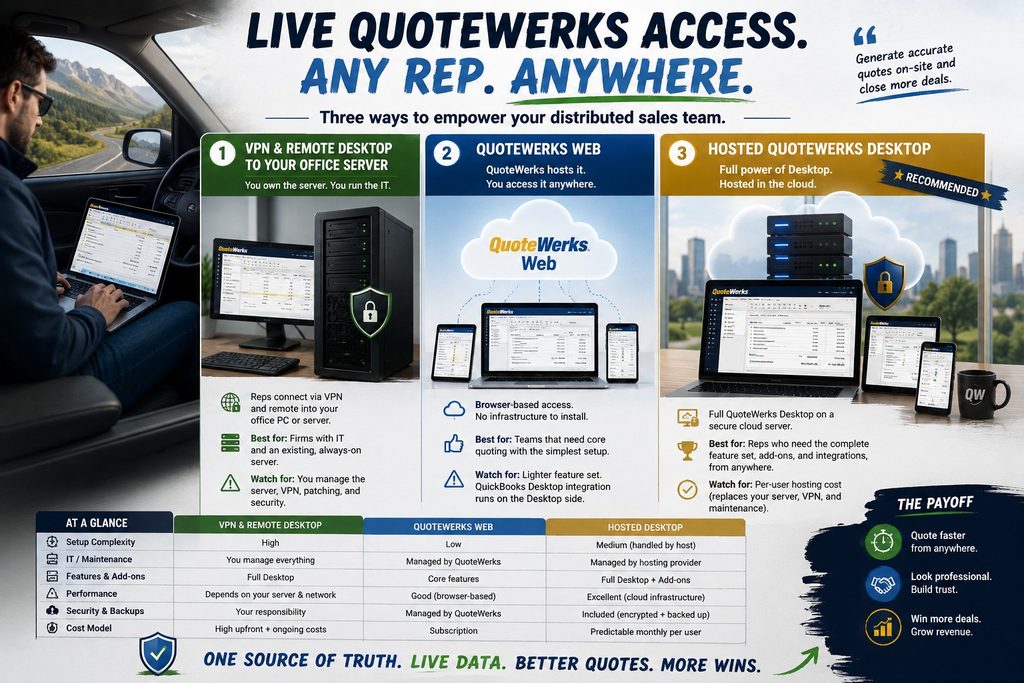
To give a distributed sales team live QuoteWerks remote access, you have three main options: a self-managed VPN and remote desktop into your office server, QuoteWerks Web, or hosted QuoteWerks Desktop. All three put your reps in the same quoting data from the road, but they differ a lot in what your team can do and how much IT you have to run. The right choice comes down to how much of QuoteWerks your reps actually need and how much of the setup you want to own. Here are the options, how each one is set up, and which fits a field team best. The old workaround, emailing a database copy or quoting from memory and fixing it later, creates the errors and delays no sales team wants.
Three ways to give your team remote access
Setting it up without the headaches
The payoff of getting this right is speed. A rep who can pull live pricing and build a quote on-site, then send it before leaving the parking lot, closes faster than one who takes notes and rekeys everything back at the office. Remote access is really about shortening the gap between the conversation and the quote, so the setup you choose should protect that speed rather than get in its way.
The three options differ most in who does the work. The VPN-and-remote-desktop route is the heaviest: you need an always-on office server, a configured VPN, remote-desktop access for each rep, and someone to patch and secure all of it. It can work well, but you are running IT to do it, and a slow home connection or an overloaded server shows up as lag in the field. QuoteWerks Web is the lightest to stand up, since the vendor hosts the database and there is nothing to install, though you accept its lighter feature set in return. Hosted QuoteWerks Desktop sits in between on effort and ahead on capability: a host sets up the cloud server, installs your QuoteWerks version and add-ons, and your reps simply log in. You get the full Desktop without running the infrastructure yourself. Security is part of that setup, not an afterthought: a hosted environment brings encryption, multi-factor authentication, and managed backups by default, whereas a self-run VPN puts all of that on you. And because a hosted server sits on business-grade infrastructure, field performance does not hinge on the health of one aging office machine.
Which fits a distributed sales team?
For most field teams, the answer turns on features. If your reps only need core quoting and you want the simplest possible setup, QuoteWerks Web is a fine home. If they rely on the full Desktop, its add-ons, procurement, or the QuickBooks Desktop integration, hosted QuoteWerks Desktop gives them all of it from anywhere, which is the combination the other two cannot match on their own. The self-managed VPN route really only makes sense if you already run a capable server and have IT to keep it healthy. Our QuoteWerks hosting page walks through how the hosted Desktop setup works. Picture a rep at a customer site who needs to check real availability, apply contract pricing, and email a quote before the meeting ends; on the full hosted Desktop, every one of those steps lives in the same window. Hosted Desktop also scales cleanly as you grow, since adding a rep is a new login rather than another VPN client to configure.
One more thing worth knowing for sales teams: many QuoteWerks users also run Act! for their CRM, and both can live in the same hosted workspace so reps move between quoting and contacts without switching systems. If that describes your team, our Act! hosting pairs naturally with hosted QuoteWerks.
Remote QuoteWerks questions
Can my sales reps use QuoteWerks from the field?
Yes. You can give field reps access through QuoteWerks Web, hosted QuoteWerks Desktop, or a VPN and remote desktop into your office server. The best fit depends on which QuoteWerks features they need and how much setup you want to manage.
What is the easiest way to give remote access?
QuoteWerks Web or hosted QuoteWerks Desktop, since neither asks you to run an office server and VPN yourself. Web is the lightest to start; hosted Desktop gives you the full feature set with the setup handled for you.
Do all reps see the same live data?
Yes. With a hosted setup or QuoteWerks Web, everyone works from one live database, so a quote a rep builds in the field is the same record the office sees, with no copies to reconcile later.
Does the QuickBooks Desktop integration work remotely?
The QuickBooks Desktop integration runs on the Desktop side. Hosted QuoteWerks Desktop keeps quoting and that integration together in one environment, so your remote reps get both without a separate setup.
Can I host QuoteWerks and Act! together for my team?
Yes. QuoteWerks and Act! can run in the same hosted workspace, so reps move between quoting and their CRM without switching systems or logging in twice. It is a common setup for sales teams that use both.
Want your reps quoting from anywhere?
A 15-minute call is enough to find the right remote-access setup for your QuoteWerks team, and what it would cost.
Book a 15-min consult
Leave a Reply