

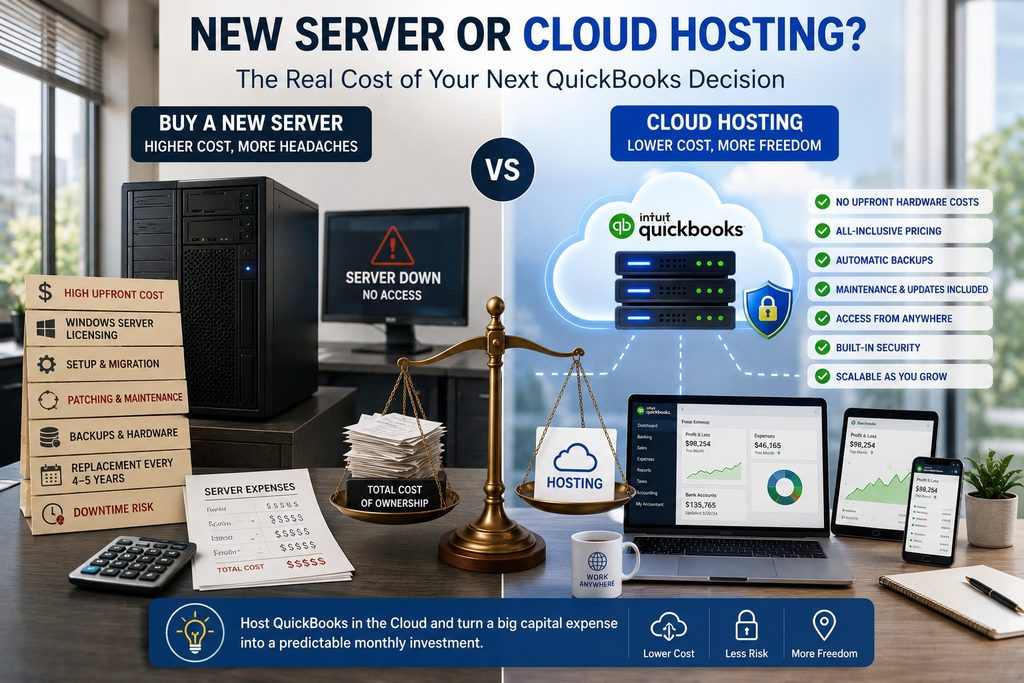
When it is time to replace your aging accounting server, you have two real paths: buy new hardware, or host QuickBooks in the cloud and retire the box. For most small firms, hosting is the better value, because a new server costs far more than its price tag suggests. The hardware is only the first line on the invoice. Add licensing, setup, patching, backups, and the fact that you will do this all again in a few years, and the “just buy a server” option gets expensive fast. Here is an honest look at what each path really costs, and when buying new still makes sense.
What a new server actually costs
The purchase price is the part everyone sees. The rest is easy to underestimate until the bills arrive.
Line one is a purchase. Lines two through seven are a commitment. That is the real comparison, not hardware price against a monthly fee, but total ownership against a service that folds most of these in.
Take a five-person firm whose server is four years old. A new box, Windows Server licensing, and a weekend of migration land in the thousands before anyone logs in, and the same clock immediately starts ticking toward the next refresh. Hosting the same QuickBooks setup skips the purchase entirely and puts those five users on current, maintained infrastructure the same week.
What hosting replaces it with
Hosting turns that list into a single predictable cost. Your QuickBooks runs on a cloud server a provider maintains, and the hardware, the Windows Server licensing, the patching, the backups, and the security are all part of the service rather than separate bills you chase. There is no box in the office to fail, no replacement cycle to budget for, and your team reaches the software from anywhere instead of only from the desks wired to the old server. It is honest to say hosting is an ongoing cost too, it is not free, but it bundles the things you would otherwise buy, staff, and replace piece by piece, and it turns a lumpy every-few-years capital purchase into a steady operating expense you can plan around. For a small firm without dedicated IT, that predictability is often worth as much as the savings. It also gives back the hours your team or your IT contact currently spends nursing an aging box. You can see how it is built on our QuickBooks Desktop hosting page, or read about the underlying virtual server.
When a new server still makes sense
Hosting is not the automatic answer for everyone, and it would be dishonest to pretend otherwise. If your server runs heavy software with strict local-latency needs, or you have specific requirements that call for on-premises control, buying and keeping a server can be the right call. The same is true if you have just invested in new hardware and it has years of life left. And there is a scope question worth naming: if that server runs far more than your accounting apps, for example line-of-business or industry-specific software for your whole operation, replacing it is a bigger project than moving QuickBooks alone. That broader server replacement and vertical-app hosting is exactly what our sister brand CloudTop SaaS handles. This post is about the accounting server specifically, the box that mostly exists to run QuickBooks, Sage, or Act!, where hosting the apps and retiring the hardware is usually the cleaner, cheaper path. A simple test helps: if the server exists mainly to run your accounting apps, hosting almost always wins. If it anchors your entire operation, weigh a full replacement, and consider whether the cloud can take that on too.
Why CloudTop Office
CloudTop Office has hosted accounting software since 2000, with more than 500 businesses running their apps on Microsoft Azure in U.S. regions, backed by managed daily backups, multi-factor authentication, encryption, and 24/7 U.S.-based support. Moving off an aging server is usually a short, planned project, and often faster than sourcing and configuring new hardware in the first place. To compare the real cost of a new server against hosting for your setup, get a personalized quote.
Server-or-cloud questions
Is it cheaper to host QuickBooks or buy a new server?
For most small firms, hosting is cheaper once you count everything, not just the hardware. Add licensing, setup, patching, backups, and the fact that you replace a server every few years, and the total ownership cost usually lands above what hosting the same apps would run.
What are the hidden costs of owning a server?
Windows Server licensing and client access licenses, setup and data migration, ongoing patching and security, backups and restore testing, and replacing the hardware every four to five years. Downtime when it fails is a cost too, just a less predictable one.
Do I give anything up by hosting instead of owning?
You give up on-premises control of the hardware. In return you gain anywhere access, included security and backups, and no box to maintain or replace. For accounting apps, most firms find that trade worth making.
What if my server runs more than accounting software?
Then it is a broader replacement than moving QuickBooks alone. Our sister brand CloudTop SaaS handles general server replacement and vertical or line-of-business app hosting, so the whole workload has a cloud home, not just the accounting piece.
How long does moving to the cloud take?
Usually a short, planned project. The data copy is quick, and most of the time goes into installing add-ons, testing, and setting up users, often faster than procuring and configuring a new server would be.
Facing a server refresh, or a cloud move?
A 15-minute call is enough to compare the real cost of a new server against hosting your accounting apps, for your exact user count.
Book a 15-min consult
Leave a Reply