

QuickBooks hosting for manufacturing puts the features a shop actually runs on, advanced inventory, assemblies, and job costing, on a secure cloud server your whole operation can reach. Instead of a server humming in the corner of the shop office, your company file lives in a data center, and the floor, the buyers, sales, and the back office all work from the same live data. For manufacturers and wholesalers, that matters more than for most businesses, because the inventory and costing depth you depend on lives in QuickBooks Desktop and Enterprise, not in the lighter online version. Here is what hosting handles and why it fits this industry so well.
Why manufacturers and wholesalers move QuickBooks to the cloud
Most shops end up with QuickBooks on a single server or workstation in the office, and that setup fights the way the business actually runs. The warehouse team needs current counts, but the file is chained to the front office. A buyer wants to check stock from a supplier’s site and cannot. Sales quotes without knowing what is really on the shelf. And when the office closes, so does access to the books. Hosting removes that bottleneck by putting the file where everyone can reach it, without shipping copies around or standing up a VPN.
There is also the add-on question. Manufacturers and distributors lean on tools QuickBooks Online simply does not connect to, inventory and warehouse management, barcode scanning, EDI, and shipping integrations. Those run against QuickBooks Desktop and Enterprise, and hosting keeps them in the same environment as the company file, so the whole stack works together in the cloud rather than being pulled apart. There is a hardware angle too: a shop-floor server takes a beating from dust, heat, and power blips, and it is rarely backed up as well as anyone assumes. Moving the file to a data center takes that single point of failure out of the building.
What runs better hosted
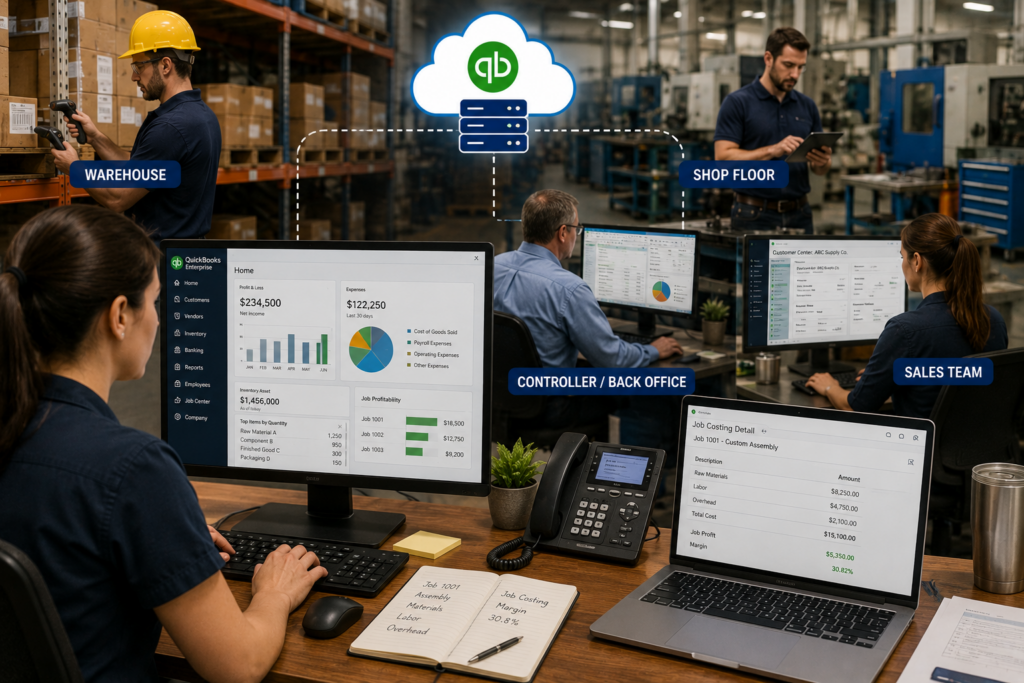
The reason this industry rarely leaves Desktop is depth. QuickBooks Enterprise Advanced Inventory handles multiple warehouses, bin locations, barcode workflows, and FIFO costing that the online version does not match. Assemblies and bills of materials let you build finished goods from components and cost them accurately. Job costing shows true margins per order. Hosting does not change any of that, it runs the exact same Enterprise features on infrastructure your team reaches from anywhere, so you keep the depth and add the access. If you have looked at QuickBooks Online and felt it could not keep up with your inventory, you were right, and hosting is how you avoid that trade. The reporting depth matters just as much: sales-order and build-point reports, inventory valuation, and profitability by item or customer are all there in Enterprise, running against your live data rather than a stale export.
One live file for the shop floor, sales, and back office
The quiet win is that everyone works from the same data at the same time. A warehouse user adjusts counts, and sales sees the change immediately when quoting. The controller pulls a job-costing report while orders are still being entered. Multi-user access means several people are in the file at once without the slowdowns an aging office server throws in during a busy stretch. For a wholesaler juggling a spring or holiday rush, or a manufacturer closing the month, that consistency is the difference between a smooth week and a frustrating one. You can read how the environment is built on our QuickBooks Desktop hosting page.
Picture a distributor with a warehouse across town. Before hosting, the warehouse phoned the office to confirm stock, and the numbers were often a day behind. Now a floor tablet updates the same file the sales desk quotes from, and the counts match because there is only one file. That is the whole idea: fewer copies, fewer surprises, and no waiting on the single PC that happens to hold the data.
Why CloudTop Office
CloudTop Office has hosted accounting software since 2000, is an Intuit Authorized Commercial Host with QuickBooks Enterprise expertise, and has direct access to Intuit Tier-3 support. That means we handle the inventory add-ons and Enterprise configurations most commodity hosts will not touch. More than 500 businesses run their software with us on Microsoft Azure in U.S. regions, with managed daily backups, multi-factor authentication, encryption, and 24/7 U.S.-based support. If you are moving off an old server before it fails, we can plan the migration around your busy season so the switch never lands mid-rush. For pricing built around your users, add-ons, and file size, you can always get a personalized quote.
Manufacturing hosting questions
Does hosting support QuickBooks Enterprise Advanced Inventory?
Yes. Hosting runs the full QuickBooks Enterprise, so Advanced Inventory, multiple warehouse locations, bin tracking, and barcode workflows all work exactly as they do on a local server, just reachable from anywhere.
Can warehouse and remote staff use the same file?
Yes. Everyone logs into one live company file from any device, so floor staff, buyers, sales, and the office see the same data at the same time, without shipping copies around or maintaining a VPN.
Will my inventory, EDI, or barcode add-ons work?
Yes. Your third-party inventory, warehouse, EDI, barcode, and shipping tools run in the same hosted environment as QuickBooks, which is exactly the integration support most commodity hosts avoid.
Is QuickBooks Online enough for a manufacturer?
Usually not. QuickBooks Online lacks the advanced inventory, assemblies, and job-costing depth manufacturers and wholesalers rely on. Hosting the Desktop or Enterprise version keeps that depth while giving you the cloud access that pushed you to look in the first place.
Can it handle multiple locations or warehouses?
Yes. Hosting centralizes one company file that every location reaches in real time, so multi-site inventory and reporting stay consistent instead of living in separate copies that drift apart.
Want to see this running with your own shop’s software?
A 15-minute discovery call is enough to know whether your setup qualifies and what remote access would look like day to day.
Book a 15-min consult
Leave a Reply