

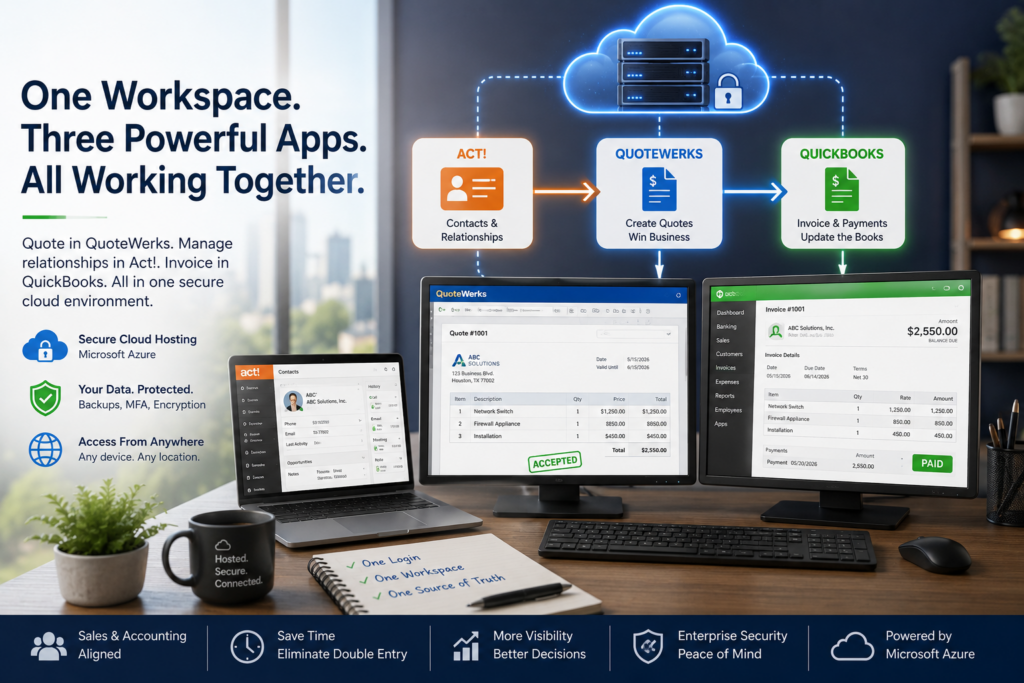
Hosting QuoteWerks, Act!, and QuickBooks together in one cloud workspace lets the three apps share data and lets your team reach all of them from anywhere with a single login. Your salespeople quote in QuoteWerks using contacts from Act!, accepted quotes become invoices in QuickBooks, and everyone works from the same secure server instead of juggling three separate installs. Here is how the stack fits together, why one workspace beats three scattered setups, and how to put it in place.
Status and payment history flow back to the Act! contact, so sales and finance see the same picture.
How QuoteWerks, Act!, and QuickBooks work together in one workspace
The three apps each own a stage of the same deal. Act! holds the customer, the history, and the notes. When it is time to quote, QuoteWerks pulls that contact straight from Act! so nobody retypes an address or a company name. Once the customer accepts, QuoteWerks hands the quote to QuickBooks as an invoice or sales order, and your customers and items stay in sync. With an add-on, the invoice and payment status shows up against the Act! contact, so your salesperson sees what your bookkeeper sees. Hosted QuoteWerks hosting and Act! hosting in the same environment are what make those links dependable.
Picture a typical deal. A lead comes in and your rep logs it in Act! with the company details and the notes from the call. When the customer asks for pricing, the rep opens QuoteWerks, pulls that Act! contact in a click, and builds the quote from your current product list. The customer signs off, and the quote exports to QuickBooks as an invoice without anyone re-keying line items. Finance sends it, records the payment, and that status shows back up on the Act! contact. One deal, three apps, no double entry.
Why one workspace beats three separate setups
Integrations are only as reliable as the connections behind them. When QuoteWerks lives on one PC, Act! on a server, and QuickBooks on someone’s laptop, the links between them break the moment a machine sleeps, an IP changes, or a VPN drops. Put all three on the same hosted server and those connections are local to each other, which means fewer failures and faster performance.
The day-to-day wins add up. Your team gets one login instead of three, and the same live data whether they are at the office, at home, or at a client site. Backups, updates, and security cover all three apps at once rather than piecemeal. And when something does go sideways between the apps, you make one call to one team instead of refereeing between three vendors. For a sales-and-finance operation, that consolidation is the whole reason to host the stack together.
Who gets the most out of it
This setup pays off most for businesses that quote a lot and bill from those quotes: IT providers and resellers, equipment and product distributors, and any sales-and-finance team where a rep and a bookkeeper touch the same deal. If your people travel or work hybrid, the anywhere-access piece matters even more, since the whole stack follows them to any device instead of staying chained to an office PC.
Setting up the stack, step by step
- Review your three apps, their versions and editions, and the links you use today.
- Build one hardened cloud workspace on Microsoft Azure in a U.S. region.
- Install QuoteWerks, Act!, and QuickBooks Desktop hosting in the same environment, along with your add-ons.
- Configure the integrations so contacts, quotes, and invoices flow between the apps.
- Migrate your data and test the full quote-to-invoice path before go-live.
- Connect your team from any device, with backups, security, and support handled for you.
We run this stack ourselves
None of this is theory for us. CloudTop Office has run QuoteWerks with Act! and QuickBooks in-house since 2008, so we set up the same stack we use every day. We have hosted business software since 2000, we are a QuoteWerks hosting partner, we have worked with Act! since 1994, and our team has direct access to Intuit Tier-3 support. Everything runs on Microsoft Azure in U.S. regions with managed daily backups, multi-factor authentication, encryption, and 24/7 U.S.-based support, and one team supports all three apps rather than three vendors pointing fingers.
To map your own stack and see what it would take, book a consultation with our team, or get a personalized quote built around your apps and users.
The integrated stack, answered
Can QuoteWerks, Act!, and QuickBooks really run in one place?
Yes. All three install on one hosted server. QuoteWerks links to Act! for contacts and exports to QuickBooks for invoicing, and an add-on can surface QuickBooks status inside Act!. Your team reaches everything through a single login.
Do the integrations work better when all three are hosted together?
Usually, yes. When the apps sit on the same server, the connections between them are local, which means fewer dropped links and faster performance than apps scattered across different machines or clouds.
Will our existing data and customizations carry over?
Yes. Your Act! database, QuoteWerks templates, QuickBooks company file, and the add-ons you already run move into the hosted workspace, so your workflows stay the same.
Who supports it if something breaks between the apps?
One U.S.-based team that knows all three applications, not just the servers. That matters most with an integrated stack, where a problem can sit between two apps rather than inside one.
Leave a Reply