

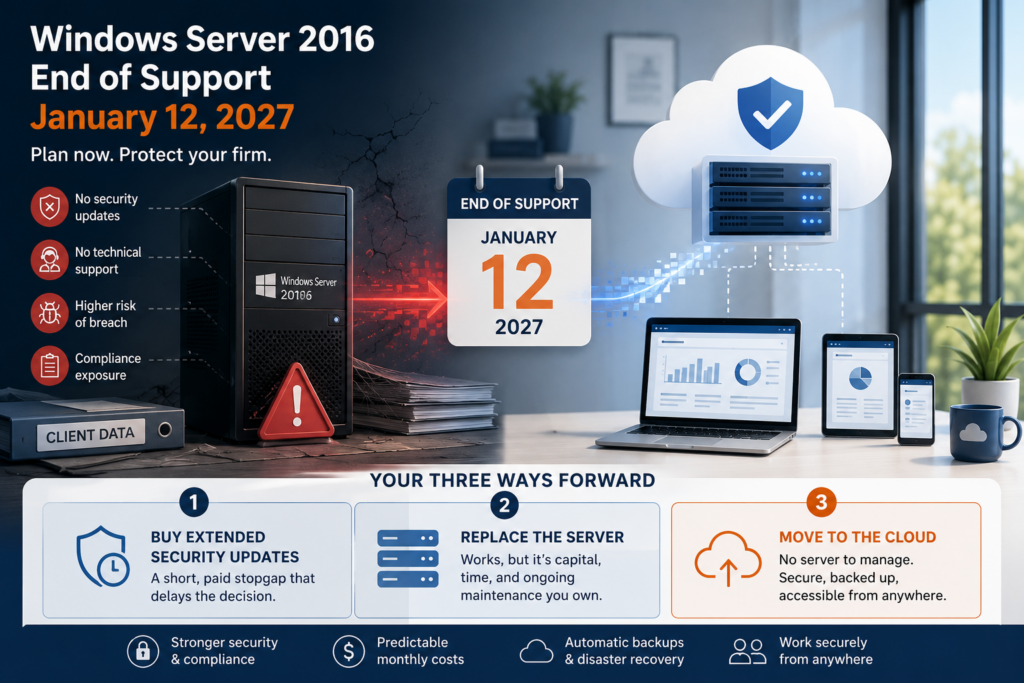
Windows Server 2016 reaches end of support on January 12, 2027. After that date, Microsoft stops shipping security updates for it, and the box in your office quietly turns into a liability. If your firm runs QuickBooks or Sage on an in-house Windows Server 2016 machine, this is the moment to make a plan rather than wait for the deadline. Here is what end of support actually means, why it matters more for firms handling financial data, and the three realistic ways forward, one of which removes the server from the picture entirely.
What Windows Server 2016 end of support means for you
End of support does not switch the server off. It keeps booting, and QuickBooks or Sage keeps running on it. What stops is protection. Microsoft no longer issues the security patches that close newly discovered holes, so every month past January 2027 the machine drifts further out of date while attackers keep finding new ways in. There are no bug fixes, no technical support, and no compliance updates. You can pay for Extended Security Updates to buy a little time, but that is a temporary, add-on cost, not a long-term answer.
The practical risk is simple: an unpatched server holding your books and your clients’ financial data is exactly the kind of target that gets exploited, and exactly the kind of system auditors and insurers have started asking about.
Why the 2027 deadline is urgent for accounting firms
For a firm that handles financial data, an out-of-support server is not just an IT problem, it is a business risk. Many cyber insurers now ask whether you run unsupported operating systems, and some will limit or deny a claim if an out-of-date server played a part in a breach. The FTC Safeguards Rule, which applies to tax and accounting practices, expects you to keep systems patched and current, and a server that stops receiving updates works against that. Add the sensitivity of the QuickBooks and Sage data sitting on that box, and waiting until December 2026 to act starts to look expensive. A breach or an extended outage does not only cost money, it costs client confidence, which is far harder to win back than any server is to replace.
There is a cost angle too. Server hardware and memory prices have climbed, so replacing an aging box is pricier than it was a few years ago. That makes it worth asking whether you need to own a server at all.
Your three ways forward
How do you choose between them? Ask what the server is really for. If it exists to run a handful of accounting apps, a hardware refresh means paying for a new box and its upkeep to do a job the cloud now does better. Extended Security Updates make sense only as a short bridge while you plan. For most small and midsize firms, the real question is less “which server” and more “do we still need one at all.”
Hosting removes the server entirely
Here is the part most owners miss: if that server exists mainly to run QuickBooks or Sage, you can retire it instead of replacing it. With hosting, your accounting software moves to a managed cloud environment, and your team reaches it from any device. There is no operating system for you to patch, no hardware to refresh in a few years, and no end-of-support deadline hanging over you, because keeping the platform current becomes your host’s job. You get QuickBooks Desktop hosting or Sage hosting on modern infrastructure with managed daily backups, multi-factor authentication, and encryption built in.
The day-to-day change is bigger than security. Your team reaches the same books from the office, home, or a client site, so there is no VPN back to a server room and no scramble when a workstation dies. The cost shifts as well, from a large hardware purchase every few years to a predictable monthly fee that folds in the maintenance, backups, and support you used to shoulder yourself. For a firm without dedicated IT, that trade is often the biggest relief of all.
If your server does more than run accounting apps, for example line-of-business software for a specific industry, our sister brand CloudTop SaaS handles broader server replacement and vertical application hosting. Either way, the goal is the same: a virtual server in the cloud rather than a box you have to keep alive.
CloudTop Office has hosted accounting software since 2000, with more than 500 businesses running their apps on Microsoft Azure in U.S. regions, backed by 24/7 U.S.-based support. To see what retiring your server would look like and cost, get a personalized quote.
Questions about the Server 2016 deadline
Can I keep using Windows Server 2016 after January 2027?
The server keeps running, and your apps keep working. What you lose are security updates, bug fixes, and support, which makes the machine steadily riskier to hold financial data on. It is usable, but not safe as a long-term plan.
What are Extended Security Updates, and are they enough?
Extended Security Updates are paid patches Microsoft offers for a limited time after end of support. They are a bridge for firms that need a few more months, not a destination. The cost recurs and the clock still runs out.
Will my cyber insurance be affected?
It can be. Many insurers now ask whether you run unsupported operating systems, and some may limit or deny a claim if an out-of-date system contributed to a breach. Check your policy, since running unsupported software is an increasingly common exclusion.
Do I have to buy a new server?
Not if the server mainly runs QuickBooks or Sage. Hosting moves those apps to a managed cloud and lets you retire the hardware, so there is no new box to buy and no operating system for you to patch going forward.
How long does it take to move off the server?
Moving QuickBooks or Sage to a hosted environment is usually a short, planned project. The data copy is quick, and most of the time goes into installing add-ons, testing your workflows, and setting up users before you switch off the old server.
Leave a Reply