

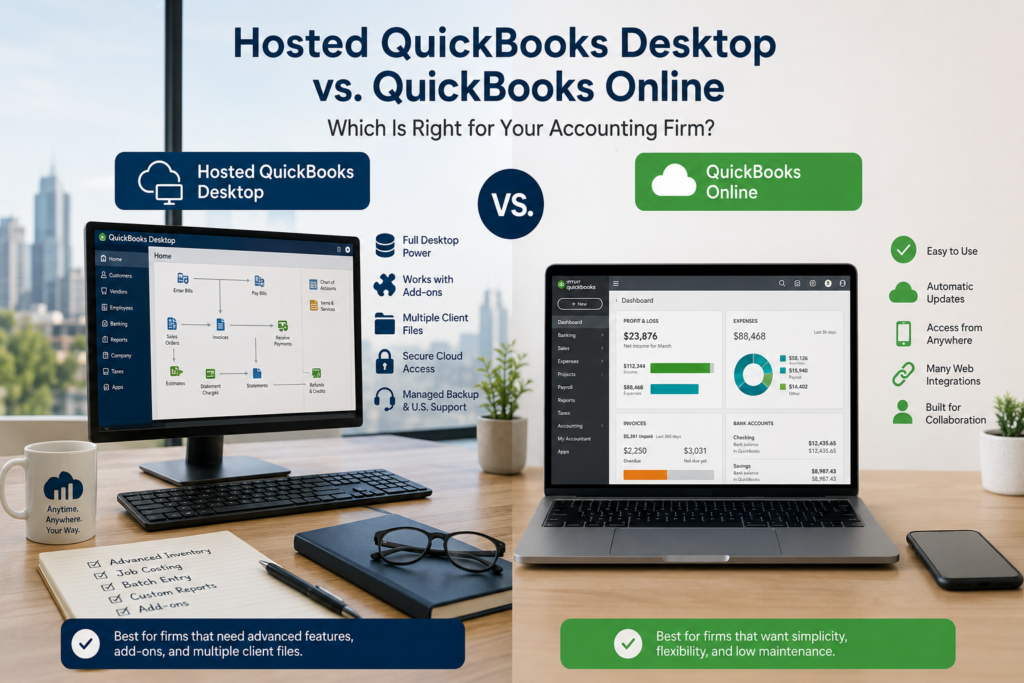
Choosing between hosted QuickBooks Desktop and QuickBooks Online comes down to one question: do you need the depth of Desktop, or the simplicity of the web? For many CPA and accounting firms, especially those running add-ons or managing dozens of client files, hosted QuickBooks Desktop keeps the power they rely on and adds anywhere access. For lean, service-based books with no heavy inventory, QuickBooks Online is often the cleaner fit. This guide compares the two on features, access, cost, and control, then gives plain verdicts by firm type so you can decide with confidence.
The Short Version
- Hosted QuickBooks Desktop is your full licensed Desktop product running on a managed cloud server. QuickBooks Online is a separate, web-built product, not a newer version of Desktop.
- Hosting wins on depth: advanced inventory, job costing, batch workflows, Desktop-only reports, and your existing third-party add-ons all carry over.
- QuickBooks Online wins on simplicity: nothing to install, automatic updates, native mobile, and a large library of web integrations.
- The QuickBooks Desktop sunset does not force you onto QuickBooks Online. Hosting a supported Desktop or Enterprise version is a full path forward.
- For most accounting firms running add-ons or multiple client files, hosted Desktop is the safer keep-what-works choice. Smaller, web-first firms often do better on QuickBooks Online.
What’s the real difference between hosted QuickBooks Desktop and QuickBooks Online?
They are two different products that happen to share a brand. Hosted QuickBooks Desktop means your licensed Desktop software runs on a managed cloud server, and you reach it remotely from any device. The program is the same QuickBooks Desktop you know, with the same menus, the same company file, and the same add-ons, only it lives in a secure data center instead of on an office PC or server.
QuickBooks Online is a web application Intuit built from the ground up for the browser. You log in at a website, the books update automatically, and Intuit handles the infrastructure. It is not a cloud copy of Desktop. It has its own feature set, its own reports, and its own app marketplace, and the gaps between the two products matter most to firms that lean on Desktop’s advanced tools.
Hosted QuickBooks Desktop vs QuickBooks Online: side by side
Here is how the two stack up on the points accounting firms ask about most.
Where hosted QuickBooks Desktop wins
Hosting earns its place when your books depend on the parts of Desktop that QuickBooks Online does not match. If you track advanced inventory, cost jobs with assemblies, enter transactions in batches, or live in Desktop-specific reports, hosting keeps every one of those workflows intact. You also keep the add-ons you already paid for and trained your team on, which is often the deciding factor for firms with a built-out software stack.
For accounting firms, the multi-file advantage is hard to give up. You can open many client company files in one hosted workspace, switch between them quickly, and let several staff work at once. Add remote access, managed daily backups, multi-factor authentication, and U.S.-based help, and you get the Desktop experience your firm runs on without a server in the office. Our QuickBooks Desktop hosting page covers how that environment is set up.
Where QuickBooks Online wins
QuickBooks Online is the better answer more often than Desktop loyalists like to admit, and being honest about that builds trust. If your books are straightforward, with light or no inventory and no need for job costing or industry reports, the web product is clean and low-maintenance. There is nothing to install, updates happen on their own, the mobile apps are solid, and the integration marketplace is deep for web-native tools like payments, expense capture, and e-commerce.
It also suits firms that want every user on the latest version with zero coordination, and businesses that prefer a single Intuit relationship for software and support. If that sounds like you, our overview of QuickBooks Online walks through where it fits best. The honest summary: pick QuickBooks Online when simplicity matters more than depth.
Which one is right for your CPA firm?
The general comparison only goes so far, so here are plain verdicts by firm type.
- Solo preparer or micro-business, simple books: QuickBooks Online is usually the right call. You get clean, current books with little to manage.
- Multi-user firm running add-ons: Hosted Desktop almost always wins. You keep the integrations and workflows your team depends on, and you add anywhere access.
- Accountant or bookkeeper managing many client files: Hosted Desktop shines when those clients run Desktop. If most of your clients are on QuickBooks Online already, QuickBooks Online Accountant may fit better.
- Inventory, manufacturing, or construction work: Hosted Desktop or Enterprise, for the inventory and job-costing depth QuickBooks Online does not match.
- Firm that wants pure web access and no version to manage: QuickBooks Online, as long as you have checked that it covers your reports and workflows first.
What about cost?
Compare total cost, not headline price. QuickBooks Online is a monthly subscription per company, billed by plan tier. Hosted Desktop adds a per-user monthly hosting fee on top of the QuickBooks license you already hold. On a single line item, the web subscription can look cheaper. The fuller picture includes the add-ons you would have to replace if you moved to QuickBooks Online, the staff time lost relearning workflows, and the value of keeping reports and processes that already work.
One more factor changed in early 2026: Intuit raised QuickBooks Desktop prices, including Enterprise. That makes the hosting-versus-online math worth running with current numbers for your exact setup rather than a rule of thumb. Pricing here is custom and per user, with no hidden fees, so the cleanest way to compare is to get a personalized quote and put it next to your QuickBooks Online estimate.
Can you switch later?
You can, but plan it rather than improvise it. Moving from Desktop to QuickBooks Online involves a data conversion that has limits, especially with large files or long histories, and some Desktop detail does not carry over cleanly. Going the other direction, from QuickBooks Online back to Desktop, is also possible but more involved. The takeaway is simple: choose based on where your firm needs to be for the next few years, and treat any switch as a project with testing built in, not a one-click move.
Does the choice affect performance at tax season?
It can, and for firms that do most of their work in a few intense months, this deserves a hard look. Hosted Desktop performance depends on how the environment is provisioned, so a well-sized host keeps multi-user company files responsive even when the whole team is in the books at once. An aging on-prem server tends to do the opposite, slowing down in the exact weeks you cannot afford it. QuickBooks Online leans on your internet connection and Intuit’s platform, and it holds up for standard workloads, though very large files and heavy reporting can feel different from Desktop. Whichever way you lean, ask how the provider sizes environments for peak season before you commit.
What about data security and compliance?
Both products are built to be secure, so the real question for an accounting firm is which model fits your obligations. Tax and accounting firms fall under the FTC Safeguards Rule, which expects a written security program, encryption, multi-factor authentication, and oversight of the vendors that handle client data. With QuickBooks Online, Intuit holds your data in its own cloud. With hosted Desktop, your software and files sit in a named U.S. data center with managed daily backups, multi-factor authentication, and encryption, and you have a hosting provider you can point to in your security plan and vendor documentation. Neither option replaces your own written information security program, but a hosting partner that understands accounting compliance can make that paperwork easier to satisfy.
How CloudTop Office helps you decide
CloudTop Office has hosted accounting and sales software for small and midsize firms since 2000, and our team has direct access to Intuit Tier-3 support, so we know both products well enough to tell you when QuickBooks Online is the better fit. More than 500 businesses run their software with us. We are software experts first and hosts second, which means we look at your add-ons, your reports, and your workflows before recommending a path.
If hosted Desktop is right for you, your QuickBooks runs on Microsoft Azure in U.S. regions with managed daily backups, multi-factor authentication, encryption, and 24/7 U.S.-based support. To compare your options against a real plan built around your firm, get a personalized quote.
Frequently asked questions
Is hosted QuickBooks Desktop the same as QuickBooks Online?
No. Hosted QuickBooks Desktop is your full Desktop product running on a cloud server you access remotely. QuickBooks Online is a separate web application with its own features and reports, not a cloud version of Desktop.
Is QuickBooks Online cheaper than hosted QuickBooks Desktop?
On a single line item it can look cheaper, since it is one subscription. The fair comparison is total cost, including the add-ons you would replace, staff time relearning workflows, and the value of keeping processes that already work. Run the numbers for your exact setup before deciding.
Can a CPA firm run multiple client files better on one or the other?
Hosted Desktop lets you open many company files in one workspace, which suits firms whose clients run Desktop. QuickBooks Online is one company per subscription, and accountants manage multiple client companies through QuickBooks Online Accountant. The better choice depends on what your clients already use.
Will my QuickBooks Desktop add-ons work in QuickBooks Online?
Often not. QuickBooks Online uses its own marketplace of web apps, which is not the same as your Desktop add-ons. Hosting keeps those add-ons running in the same environment, which is a common reason firms choose hosted Desktop over a move to QuickBooks Online.
Do I have to move to QuickBooks Online now that Desktop versions are sunsetting?
No. The sunset retires older Desktop versions on a schedule, but you can keep using Desktop by hosting a version Intuit still supports, or QuickBooks Enterprise. Moving to QuickBooks Online is a choice, not a requirement.
Can I switch from QuickBooks Online back to Desktop later?
It is possible but involved, with data conversion limits in both directions. Treat any switch as a planned project with testing rather than a one-click move, and choose based on where your firm needs to be for the next few years.
Leave a Reply