

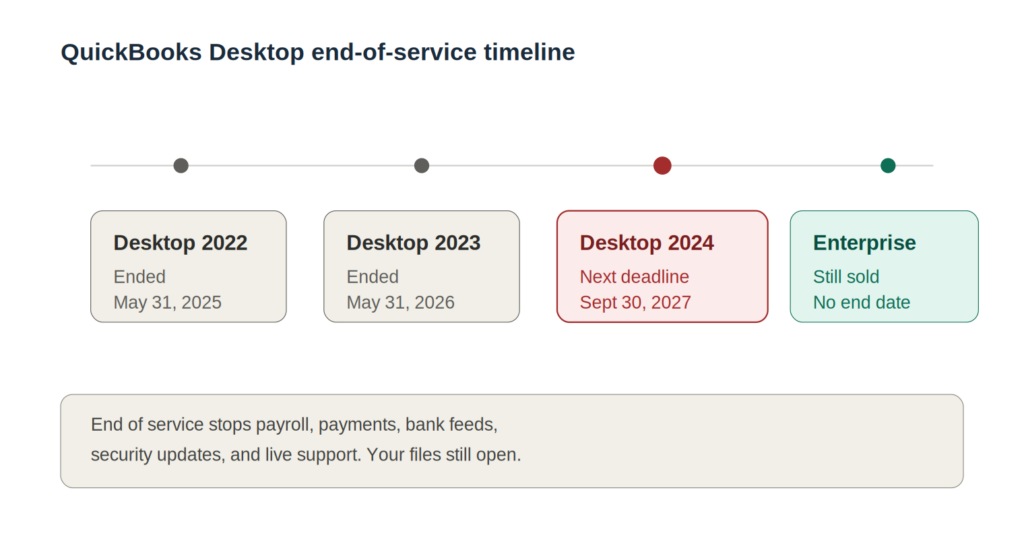
No, QuickBooks Desktop is not going away. But specific versions are reaching their end-of-service dates, and that is where the confusion comes from. QuickBooks Desktop 2023 reached end of service on May 31, 2026, and QuickBooks Desktop 2024 is next, on September 30, 2027. Your software keeps opening after those dates. What stops are the services that connect to Intuit’s servers, such as payroll, bank feeds, and security updates.
If you have heard that Intuit is killing off Desktop entirely, that rumor has run ahead of the facts. The picture is more specific, and once you understand the difference between a product being discontinued and a version reaching end of service, your options get a lot clearer. This guide walks through what is actually happening, which versions are affected, and the practical paths forward for businesses that want to keep the Desktop software they already know.
Key Takeaways
- QuickBooks Desktop is not being discontinued as a product. Intuit continues to sell and develop QuickBooks Desktop Enterprise.
- QuickBooks Desktop 2023 reached end of service on May 31, 2026. QuickBooks Desktop 2024 is next, on September 30, 2027.
- End of service means connected features stop: payroll, payments, bank feeds, security updates, and live technical support.
- You can still open and use your company files after end of service. The software does not shut off.
- You do not have to migrate to QuickBooks Online. Hosting your Desktop or Enterprise software in the cloud lets you keep the same product while regaining remote access, multi-user collaboration, and managed backups.
Is QuickBooks Desktop going away?
No. QuickBooks Desktop as a product is not disappearing. What is happening is that older versions are aging out of Intuit’s support window, and Intuit has narrowed the lineup it sells going forward. Three separate things tend to get blended together in the rumor mill, so it helps to pull them apart.
Product discontinuation
Product discontinuation would mean Intuit stops offering QuickBooks Desktop at all. That has not happened. Intuit continues to sell and update QuickBooks Desktop Enterprise. What Intuit did do, as of September 30, 2024, was stop selling new Pro Plus, Premier Plus, and Mac Plus subscriptions to new U.S. customers. Existing subscribers can still renew. So the annual boxed-version model has wound down for those editions, but the software family lives on.
End of service
End of service is a per-version event tied to Intuit’s rolling three-year support window. When a version ages out, it loses live support, security updates, and any feature that talks to Intuit’s servers. This is the deadline most people are actually reacting to, and it is the one with real consequences. More on exactly what stops below.
Ongoing availability of Enterprise
QuickBooks Desktop Enterprise sits in its own lane. Intuit continues to sell it, develop it, and support it on a separate timeline. If your business runs Enterprise, the “Desktop is dead” headlines do not describe your situation at all.
QuickBooks Desktop timeline: 2022 to 2027
Here is the end-of-service picture for recent versions. These dates come from Intuit’s published service discontinuation policy. Because Intuit updates this periodically, it is worth confirming against Intuit’s site if you are reading this well after the publish date.
| QuickBooks Desktop version | End of service | Status |
|---|---|---|
| QuickBooks Desktop 2022 | May 31, 2025 | Ended |
| QuickBooks Desktop 2023 | May 31, 2026 | Ended |
| QuickBooks Desktop 2024 | September 30, 2027 | Next deadline (last non-Enterprise version) |
| QuickBooks Desktop Enterprise | No announced end date | Actively sold and supported |
A few things stand out. Both QuickBooks Desktop 2022 and 2023 are now past their dates, so anyone still running either is on unsupported software today. QuickBooks Desktop 2024 is the live deadline, with its cutoff arriving September 30, 2027. And the 2024 version is notable for being the last standalone annual version Intuit plans to release. There is no Desktop 2025, 2026, or 2027 on the way. Instead, Intuit has been shipping periodic updates to the 2024 version rather than new yearly editions.
Not sure which version you are on? Open QuickBooks Desktop and press F2 (or Ctrl+1) to open the Product Information window. Your version year and release number appear at the top.
What happens when QuickBooks Desktop reaches end of service?
When a version hits end of service, the program itself still launches and your company files still open. What you lose is everything that depends on a connection to Intuit. Here is what that means in practice.
Payroll stops working
Payroll is usually the first pain point. After end of service, payroll tax tables stop updating, which means withholding and tax calculations freeze at the last available figures. If you run payroll inside QuickBooks Desktop, this is the change that most directly affects whether you can keep paying employees correctly. A construction firm processing weekly payroll for 30 field staff cannot afford stale tax tables.
Payments processing ends
If you accept customer payments through QuickBooks Desktop Payments, that connection shuts off. Invoices can still be created, but the ability to process a card or ACH payment from inside Desktop goes away on an unsupported version.
Bank feeds disconnect
Automatic bank and credit card feeds stop downloading. For a bookkeeper used to reconciling against a live feed, this means going back to manual entry or importing transactions by hand. It is workable, but it is slower and more error-prone, especially at month-end.
No more security updates
This is the quiet risk. Intuit stops issuing critical security patches for the version, so any newly discovered vulnerability stays unpatched. For firms handling client financial data, that is a real exposure, and it is exactly the kind of gap that frameworks like the FTC Safeguards Rule and IRS Publication 4557 expect you to close.
No technical support
Live technical support from Intuit ends for that version. If something breaks, you are on your own or reliant on a third party. For a small office without dedicated IT, losing that safety net during, say, tax season is a problem worth planning around.
Which versions are affected?
The end-of-service dates apply across the QuickBooks Desktop editions tied to each version year. For the May 31, 2026 cutoff that the 2023 version has now passed, that includes:
- QuickBooks Desktop Pro Plus 2023 — the standard edition for small businesses with straightforward accounting needs.
- QuickBooks Desktop Premier Plus 2023 — the edition with industry-specific reports and tools, common in professional services and niche industries.
- QuickBooks Desktop Mac Plus 2023 — the Mac edition, which follows the same lifecycle.
- QuickBooks Enterprise Solutions 23.0 — note that while the 23.0 version reaches end of service, Enterprise as a product line continues (see the next section).
So who is actually impacted? Anyone running the 2022 or 2023 version is now on unsupported software, since both of those dates have passed. If you are still on either, the practical move is to get onto a supported version (or a hosted environment running one) before the lost connected services start to bite. If you are on the 2024 version, you have more runway, until September 30, 2027, but it is worth starting to plan now since testing options and migrating data takes time.
What about QuickBooks Enterprise?
QuickBooks Desktop Enterprise is the exception to everything above. It is the only Desktop edition Intuit continues to actively sell and develop, and it does not have an announced end-of-service date the way the Pro and Premier version years do. Individual Enterprise version numbers still age out of the support window, but the product line itself is carried forward.
That is one reason a lot of growing businesses settle on Enterprise. It handles larger data files, more simultaneous users, advanced inventory, and deeper reporting than Pro or Premier, and it is the clearest “stay on Desktop” path for firms that have outgrown the smaller editions but have no interest in rebuilding their accounting around a browser-based product.
Worth knowing: QuickBooks Enterprise can be hosted in the cloud while keeping the full Desktop experience intact. Same screens, same reports, same add-ons, just running on a managed server you reach from any device instead of a box in your office. We will come back to what that looks like below.
Can you continue using QuickBooks Desktop after support ends?
Yes, technically. The software does not lock you out, and your company files stay accessible. But “can” and “should” are different questions, and the honest answer involves trade-offs.
The benefit
The obvious upside is that you avoid a forced change. Your workflows, your file structure, your reports, and your muscle memory all stay exactly as they are. For a business in the middle of a busy stretch, not having to relearn anything has real value.
The risks
The risks are the flip side of that list of services that stop. No security updates means a widening exposure over time. No payroll updates means manual tax-table workarounds or a separate payroll service. No bank feeds means slower reconciliation. And no support means a broken file becomes your problem to solve alone.
Compliance concerns
For accounting and tax firms specifically, running unsupported, unpatched software sits awkwardly against data-protection expectations. The FTC Safeguards Rule and IRS Publication 4557 both push firms toward maintaining current security controls. Software that no longer receives patches makes that harder to demonstrate.
Security concerns
An unpatched accounting application holding client financial data is a meaningful target. The longer it runs without updates, the larger the window of unaddressed vulnerabilities becomes.
Productivity limitations
The cumulative effect of lost connected services is friction. Manual entry where feeds used to flow, workarounds where payroll used to update, and no support line when something stalls. None of it is catastrophic on day one, but it compounds.
The best way to keep QuickBooks Desktop
Here is the part most of the “Desktop is dying” coverage skips: you do not have to choose between staying on aging software and migrating to QuickBooks Online. There is a third path that lets you keep using QuickBooks Desktop, on a current supported version, while solving the very problems an on-premises install creates.
That path is QuickBooks Desktop hosting. Hosted QuickBooks Desktop means your licensed Desktop software runs on a managed cloud server that you and your team access remotely, instead of being installed on a local PC or office server. You keep the exact same product. What changes is where it runs and who maintains the infrastructure around it.
For businesses that want to stay on Desktop, hosting addresses the practical issues:
- Keep your existing workflows. Same Desktop interface, same reports, same add-ons. Nothing to relearn.
- Access QuickBooks remotely. Work from home, a client site, or a second office, from any device with a connection.
- Enable multi-user collaboration. Several people work in the same company file at once without a local server humming in a closet.
- Improve security. A reputable host runs current patching, multi-factor authentication, encryption, and hardened remote access.
- Eliminate local server dependence. No aging hardware to maintain, no VPN headaches, no on-site backup tapes.
- Maintain business continuity. Managed daily backups and redundant infrastructure mean a dead office PC is an inconvenience, not a crisis.
CloudTop Office is an Intuit Authorized Commercial Host that helps businesses keep using QuickBooks Desktop and Enterprise securely from anywhere. We have hosted accounting and sales software for small and mid-sized firms since 2000, we run on Microsoft Azure in U.S. regions, and our support team is U.S.-based with direct access to Intuit Tier-3 support. The point is not to push you off Desktop. It is to let you stay on it without the on-premises baggage.
Why businesses are choosing hosted QuickBooks instead of switching
The choice many firms are weighing is not really “Desktop versus Online.” It is “keep Desktop the old way versus keep Desktop in the cloud.” Here is how a traditional local installation compares to hosting on the dimensions that tend to drive the decision.
| Factor | Traditional local installation | QuickBooks Desktop hosting |
|---|---|---|
| Accessibility | Tied to the office PC or local network; remote access needs a VPN or workarounds | Secure access from any device, anywhere with an internet connection |
| Security | Your responsibility: patching, backups, and access control fall on you | Managed patching, MFA, encryption, and hardened remote access |
| Collaboration | Multi-user requires a local server and on-site networking | Multiple users in the same file from different locations |
| IT costs | Server hardware, maintenance, and replacement cycles | Predictable per-user model; no server to own or maintain |
| Disaster recovery | As good as your last manual backup and your building’s safety | Automated daily backups and redundant cloud infrastructure |
To be fair about it, hosting is not the right answer for everyone. A solo owner with a tiny, simple book and no need for remote access or add-ons may genuinely be better served staying local or moving to QuickBooks Online. The honest test is whether the Desktop feature set, your add-ons, and multi-user access matter to how you work. If they do, hosting usually beats both alternatives.
Frequently asked questions
Is QuickBooks Desktop being discontinued?
Not as a product. Intuit continues to sell and support QuickBooks Desktop Enterprise. What is happening is that older version years reach end of service on a rolling schedule, and Intuit stopped selling new Pro Plus, Premier Plus, and Mac Plus subscriptions to new U.S. customers as of September 30, 2024.
What happens to QuickBooks Desktop 2023 after May 2026?
QuickBooks Desktop 2023 reached end of service on May 31, 2026. Now that the date has passed, payroll, payments, bank feeds, security updates, and live technical support no longer work on that version. The software still opens and your files remain accessible.
What happens to QuickBooks Desktop 2024 after September 2027?
QuickBooks Desktop 2024 reaches end of service on September 30, 2027. The same connected services stop at that point. The 2024 version is also the last standalone annual non-Enterprise Desktop release Intuit plans to ship.
Can I keep using QuickBooks Desktop after support ends?
Yes. The program keeps running and your company files stay open after end of service. You lose the connected services and security updates, which is why most businesses move to a current supported version, often hosted in the cloud, rather than running unsupported software long-term.
Is QuickBooks Enterprise going away?
No. QuickBooks Desktop Enterprise is the one edition Intuit continues to actively sell and develop, and it does not have an announced product end date. It is the clearest path for businesses that want to stay on Desktop long-term.
Do I have to switch to QuickBooks Online?
No. QuickBooks Online is one option, but it is not the only one. You can upgrade to a supported Desktop version, move to Enterprise, or host your Desktop software in the cloud to keep the full Desktop experience while gaining remote access and managed security.
What is QuickBooks hosting?
QuickBooks hosting means your licensed QuickBooks Desktop software runs on a managed cloud server that you access remotely. You get the exact same Desktop product with the benefits of cloud infrastructure: anywhere access, multi-user collaboration, managed backups, and stronger security.
How do I know which QuickBooks Desktop version I have?
Open QuickBooks Desktop and press F2 (or Ctrl+1) to open the Product Information window. Your version year and release number appear at the top.
Is it safe to keep running an unsupported version of QuickBooks Desktop?
It carries growing risk. Once a version stops receiving security updates, any newly discovered vulnerability goes unpatched. For firms handling client financial data, that runs against data-protection expectations under the FTC Safeguards Rule and IRS Publication 4557.
Can QuickBooks Enterprise be hosted in the cloud?
Yes. QuickBooks Enterprise can be hosted with the full Desktop experience preserved, including advanced inventory, reporting, and third-party add-ons. You access it remotely from any device while an authorized host manages the infrastructure, backups, and security.
The bottom line
QuickBooks Desktop is not disappearing. The deadlines you have been hearing about are version-specific end-of-service dates: the 2023 version reached its cutoff on May 31, 2026, and the 2024 version is next, on September 30, 2027. End of service is not the same as the software shutting off, but it does mean losing payroll, payments, bank feeds, security updates, and support. And Enterprise remains fully available for businesses that want to stay on Desktop indefinitely.
If you like your Desktop software and would rather not rebuild your accounting around a browser, you have a practical path: keep Desktop and host it in the cloud. You hold onto the workflows you know while gaining the remote access, collaboration, and managed security that an on-premises install can’t match on its own.
Want to see what that would look like for your business? Get a personalized quote from CloudTop Office, or book a consultation with our U.S.-based team to talk through your version, your add-ons, and the right path forward.
Leave a Reply