
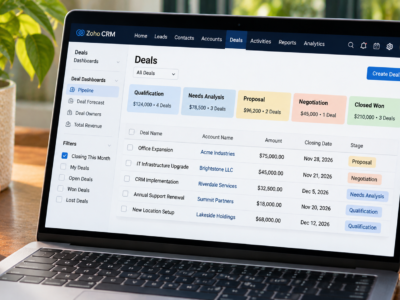
It is Wednesday, and a deal in Zoho CRM is dated to close on Friday. The forecast meeting is tomorrow, the amount matters to the month, and the closing date says it belongs in. But the buyer’s most recent note says purchasing approval is still pending. Should the deal stay in this month’s forecast?
The decision is easy to make on the wrong evidence. A closing date records what someone expected when they entered it. It does not show whether the buyer’s position has changed since. Keeping a stalled deal in makes the month look stronger than it is, and pulling a healthy one out without a reason makes the forecast less reliable in the other direction. Either way, the cost comes from not checking the buyer’s latest position first. A Zoho CRM sales forecast review is meant to catch exactly that.
What a sourced brief could show
In the review we propose, AI would read only the records a business selects and permits: the deal record, its dated notes and activities, and buyer correspondence the business has approved for this use. From those, it would prepare a short brief for the sales manager. The rule that matters most is that every observation points back to its source, so the manager can open the record and check it rather than trusting a summary.
This example describes a proposed AI-assisted workflow that would need to be configured and tested for your business, rather than a feature available automatically in every Zoho CRM account. Part of that setup is deciding how data is protected. The review would follow the permissions of the person running it, so it only reads what that user is already allowed to see. It would use only AI services the business has approved, with agreed rules for how long briefs and source material are kept. And confidential buyer correspondence stays out unless the business has explicitly approved it for this use.
The gap is the useful part. The brief does not decide that the deal will slip, and it does not fill in the missing approval with a guess. It shows that the evidence for Friday is incomplete and leaves that as an open question for a person to answer.
The sales manager still makes the call
From there, the decision stays with the sales manager. They check the sources, perhaps with a quick question to the rep who owns the deal. They choose how the deal is treated this month, whether that means keeping it in, moving it to a later month, or marking it as at risk, depending on how the team forecasts. And they approve any change before it happens, whether that is a new closing date in Zoho CRM or a follow-up to the buyer. Nothing is changed or sent on the brief’s say-so.
This is the kind of review we would design with a team through our Zoho consulting: which records the brief may read, how sources are shown, and where a person approves each step. CloudTop Office is a Zoho Certified AI-Enabled Partner, and the work starts from the sales process you already use.
Questions about AI and Zoho CRM forecasts
Can AI improve sales forecasting in Zoho CRM?
Can AI automatically change a deal’s closing date?
What CRM data should an AI sales forecast review use?
Is there a forecast call like this every month?
Describe one difficult example in a 30-minute AI Enablement consultation. A description is enough for the first conversation.
Request a 30-minute consultationAlready sent a request? Choose a time.
 Buying Business Software: What to Share With Your MSP
Leave a Reply