

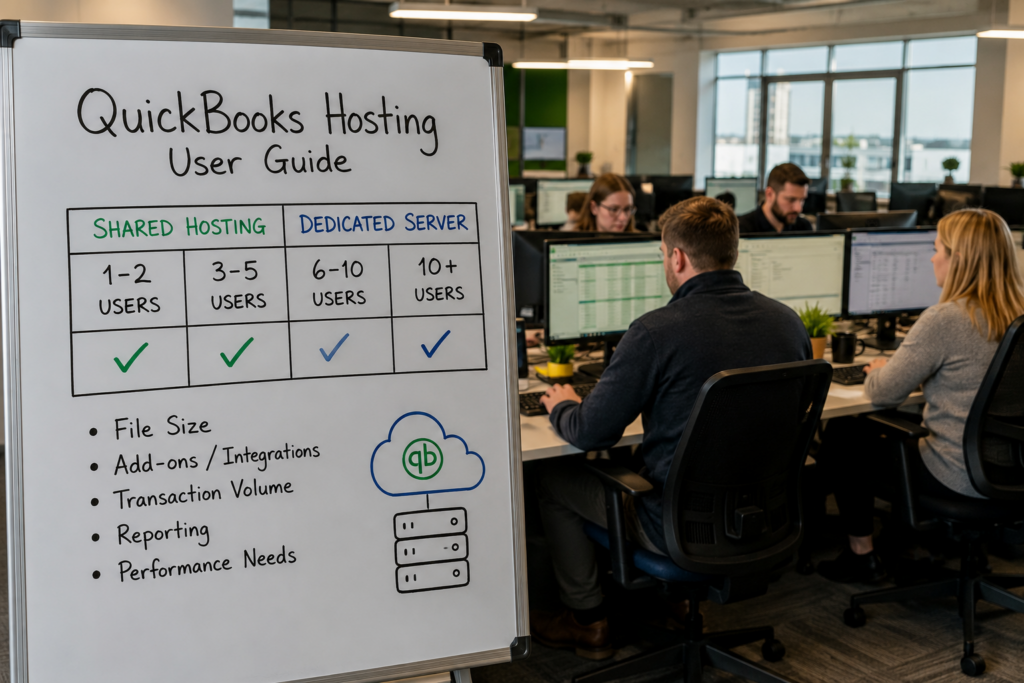
With QuickBooks multi-user hosting, most firms run comfortably on shared hosting up to around five users, and often beyond. But the honest answer to “how many users before I need a dedicated server?” is that it was never really about the number. A lean team with a heavy company file and a stack of add-ons can strain a shared setup at four users, while a tidy file can sail past eight. The real trigger is load, not headcount. This ladder shows where most firms land, and the sections below explain what actually moves you up a rung.
It’s not really about a number
Competitors love to quote a clean figure, usually three to five users, because it is easy to say. It is also only half true. That range is where the software’s own limits and typical server loads happen to line up, so it makes a fine starting assumption. What it hides is everything that changes the math.
Four things move you up the ladder faster than user count alone: the size of your company file, how many add-ons and integrations are running, your transaction volume, and how heavy your reporting is. A firm with a small file and no add-ons can keep five people productive on shared hosting without a hiccup. A firm with a multi-gigabyte file, an inventory add-on, and month-end reporting can feel the drag at four. There is also a licensing layer worth knowing: QuickBooks Pro and Premier top out at five simultaneous users, while Enterprise scales to 30 or more, so past five users you are usually on Enterprise anyway, and the hosting question becomes shared versus dedicated resources.
A quick gut check: picture two firms with the same four users. One runs a clean 1 GB file with no add-ons and closes the month fast. The other runs a 6 GB file with an inventory add-on and fires off big reports every Friday. Same headcount, very different load, and only the second is knocking on the door of a dedicated server. That is exactly why we ask about the file and the workflow before we ask about seats.
Shared vs dedicated for QuickBooks multi-user hosting
The difference comes down to who else is on the machine. With shared hosting, your QuickBooks runs on a well-provisioned server alongside other tenants, and the provider balances the load. It is cost-effective and, for typical small-team workloads, genuinely fast. With a dedicated server, the resources are reserved for you alone, so a large file, many concurrent users, or heavy reporting all have room to breathe. You pay more for that headroom, and above a certain load it is money well spent because it removes the one thing that kills productivity: waiting.
Neither tier is “better” in the abstract. Shared is right for most small firms. Dedicated is right when your usage would crowd a shared server, and the honest job of a host is to tell you which one you actually need rather than selling you up by default. The good news is that on hosting you are not locked in: you can move between tiers as your file and team change, so the decision is never permanent.
Signs you’ve outgrown shared hosting
You rarely need to guess. The symptoms are specific, and they tend to show up together.
- Saving or opening large transactions lags, especially at month-end or during tax season.
- Multi-user performance drops when everyone is in the file at once.
- Your company file has grown to several gigabytes and keeps climbing.
- Heavy add-ons or integrations are running against the file all day.
- Big reports time out or take noticeably longer than they used to.
One or two of these on a quiet week may just be housekeeping, like a file that needs cleanup. Several of them during your busy season are the file telling you it wants dedicated resources. Moving to dedicated does not change how QuickBooks looks or works, only how much room it has to run: the file is the same, your team logs in the same way, and the waiting simply goes away.
How we size it to your firm
CloudTop Office does not push everyone onto the biggest tier. We look at your user count, your file size, your add-ons, and how hard your team hits the file, then match you to shared or dedicated on that basis. If your needs are modest, you stay on shared and keep your costs down. If you are genuinely at the top of the ladder, a dedicated virtual server gives everyone consistent speed. And because it is all our infrastructure, you can start on shared and move up later without a disruptive re-migration when your firm grows. The aim is simple: pay for the performance you actually use, not a tier that looks impressive on a quote. See how QuickBooks Desktop hosting is set up, and for a setup matched to your actual usage, get a personalized quote.
Common sizing questions
How many users can QuickBooks Desktop have?
QuickBooks Pro and Premier support up to five simultaneous users, while Enterprise scales to 30 or more depending on the edition. Past five users you are typically on Enterprise, so the hosting decision shifts to shared versus dedicated resources.
Is shared hosting fine for a small team?
For roughly up to five users with a normal-sized file, shared hosting performs well and keeps costs down. Most small firms never need anything more, which is why it is the default starting point.
When should I move to a dedicated server?
When your file is large, your add-ons are heavy, or performance dips during busy periods, regardless of exact user count. A dedicated server reserves resources for you alone, which removes the contention that causes the slowdown.
Can I start shared and move to dedicated later?
Yes. A good host sizes you to your current usage and can move you up as you grow, without a painful re-migration. You do not have to over-buy on day one to plan for later.
Does having more users always mean I need dedicated?
No. A lean eight-user setup with a clean file can be fine on shared, while a heavy four-user file might want dedicated. It is about total load, the file, the add-ons, and the work, not headcount alone.
Leave a Reply