

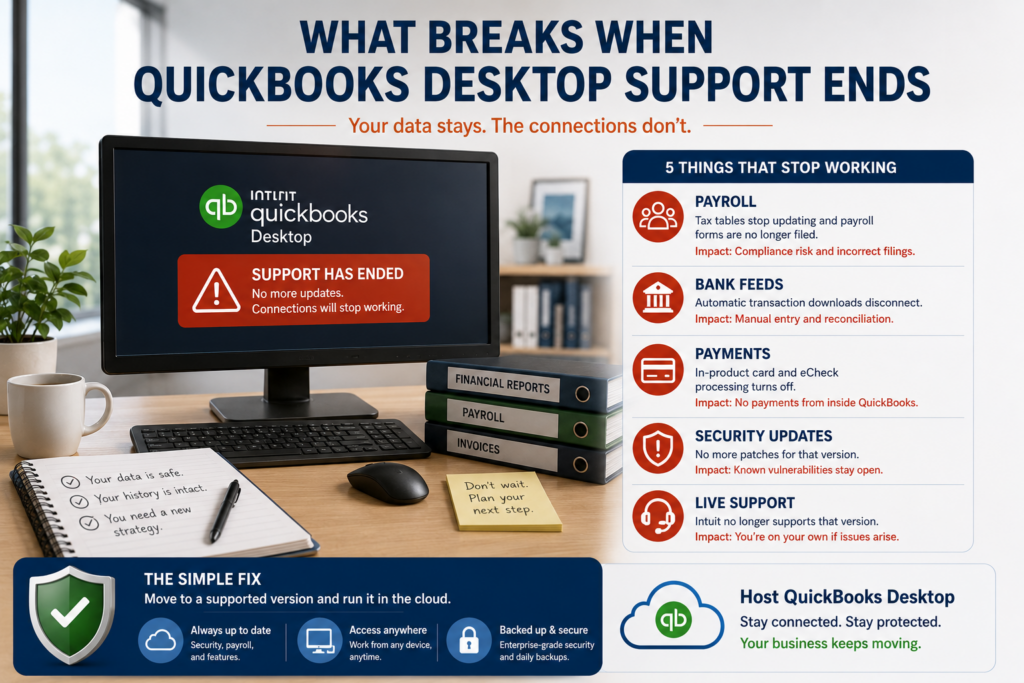
When QuickBooks Desktop support ends for your version, the software keeps opening and your data is safe, but the services that connect to Intuit go dark. Payroll stops updating, bank feeds disconnect, in-product payments turn off, and security patches end. Nothing detonates on day one, which is why the risk is easy to underestimate, but the gaps show up fast in the work you do every week. Here is exactly what breaks, why each one matters, and the simplest way to fix it.
What breaks at QuickBooks Desktop end of support
Five things stop working once your version reaches end of service. Here is each one and what it means for your business.
Two of these hurt the most. Payroll is the one that turns a technical deadline into a compliance one: if your tax tables are frozen, you are calculating withholding on stale rates and missing the automatic form filing you rely on. Security is the quiet one. An unpatched accounting program is a soft target, and it holds exactly the data a thief wants, which is why running an out-of-support version past a season or two is a gamble rather than a saving. Neither problem announces itself, which is what makes them dangerous: the numbers still calculate and the file still opens, they are just quietly wrong or quietly exposed.
Who feels it first
The timing depends on how you use QuickBooks. A business that runs payroll in-house feels it almost immediately, at the next pay run. Companies that take card payments inside QuickBooks lose that the day the service cuts off. Firms bound by the FTC Safeguards Rule or a cyber-insurance policy are exposed the moment security updates stop, even when nothing visible changes. And any business with a multi-user file and years of history has the most to lose if an unpatched machine is compromised. If two or more of those describe you, the deadline is closer in practice than the calendar suggests.
Why it gets worse over time
End of support is a slope, not a cliff. The first month feels fine, because the software still opens and last week’s data is all there. The trouble compounds quietly. Each payroll run drifts further from current rates. Every unpatched month adds newly discovered vulnerabilities that will never be fixed. And the compliance picture darkens: the FTC Safeguards Rule expects accounting and tax firms to keep systems patched and current, and many cyber insurers now ask whether you run unsupported software before they will pay a claim. What looked like a way to avoid a cost becomes a growing liability instead. There is also no safety net if something goes wrong: with support gone, a corrupted file or a failed update is yours to untangle, and the help you would have leaned on is no longer a phone call away.
The fix: host a supported version
The straightforward answer
Run a supported version of QuickBooks Desktop, and everything above comes back: payroll updates, bank feeds, payments, security patches, and support. Hosting is the cleanest way to do it, because it also puts that supported version on secure, backed-up infrastructure you reach from anywhere.
Here is the honest nuance most marketing skips: hosting does not revive an unsupported version. If you host your old build, it is still unsupported, and the connected services stay off. What hosting does is run a currently supported Desktop or Enterprise version in a managed cloud environment, so the services work again and you gain remote access, managed daily backups, multi-factor authentication, and encryption on top. You keep the full Desktop product and your add-ons, and you stop worrying about the deadline. Our QuickBooks Desktop hosting page covers how that works, and common questions are answered in our hosting FAQ. Most moves are a short, planned project, so you can be current again in days, not weeks.
CloudTop Office has hosted QuickBooks since 2000, with direct access to Intuit Tier-3 support and more than 500 businesses on Microsoft Azure in U.S. regions. To see what moving to a supported, hosted version would look like for your setup, get a personalized quote.
Common end-of-support questions
Does QuickBooks Desktop stop working at end of support?
No. The program keeps opening and your data stays intact. What stops are the connected services: payroll updates, bank feeds, payments, and security patches. You can still enter transactions by hand, but the automated pieces go dark.
Which is the most urgent thing that breaks?
Usually payroll and security. Frozen payroll tax tables become a compliance issue quickly, and unpatched software holding financial data is a growing risk. If you run payroll or hold sensitive client data, act sooner rather than later.
Can I keep using it if I don’t run payroll or take payments?
For a while, yes. But security patches still stop, so an unsupported version is a short bridge rather than a long-term plan, especially for a business that stores customer or financial data in the file.
Does hosting fix what breaks?
Hosting a supported version brings the connected services back and adds security and remote access. Hosting an unsupported version by itself does not, since the services depend on the version, not where it runs. The fix is a supported version, hosted.
How do I know when my version’s support ends?
Press F2 inside QuickBooks to see your exact version and release, then check Intuit’s service discontinuation schedule. The dates move each year as older versions age out, so it is worth confirming against the build you run today.
Leave a Reply