

You can keep using QuickBooks Desktop after Intuit stops supporting your version. The software does not switch off, and your company files stay exactly where they are. The catch is that an unsupported version loses the services that connect to Intuit, including payroll updates, bank feeds, payments, and security patches. The cleanest way to keep the Desktop product you know while solving that problem is to host it in the cloud, which keeps the full Desktop feature set and skips the forced move to QuickBooks Online.
If you have spent years building your workflow around QuickBooks Desktop, the prospect of giving it up because of a support deadline is frustrating. The good news is that you have more control than the “you must migrate” messaging suggests. This guide lays out exactly what you can and cannot do after support ends, the real risks of running unsupported software, and how hosting lets you keep Desktop running without compromise.
Key Takeaways
- QuickBooks Desktop keeps running after your version reaches end of service. You can still open and work in your company files.
- What you lose is the connected services: payroll tax tables, bank feeds, payments, security updates, and live support.
- You are not forced to migrate to QuickBooks Online. Upgrading to a supported version, moving to Enterprise, or hosting your Desktop software are all valid ways to stay on Desktop.
- Hosting keeps the full Desktop feature set, including your add-ons and reports, while restoring remote access, multi-user collaboration, and managed security.
- CloudTop Office is an Intuit Authorized Commercial Host that runs QuickBooks Desktop and Enterprise on Microsoft Azure with U.S.-based support.
Can you keep using QuickBooks Desktop after support ends?
Yes. End of service does not delete or disable QuickBooks Desktop. The application still launches, your company files still open, and you can keep entering transactions, running reports, and reconciling accounts. Intuit’s end-of-service date is about what it stops maintaining, not about locking you out of software you already paid for.
That distinction matters because the headlines blur it. “QuickBooks Desktop is going away” is not the same as “your copy stops working.” What actually changes on the end-of-service date is that the features depending on Intuit’s servers go dark. Everything that runs locally keeps going.
So the honest answer is that you can keep using it. Whether you should run it unsupported for long is a different question, and it comes down to which connected services your business actually relies on.
What stops working when support ends?
When your version reaches end of service, the local software is unaffected but the Intuit-connected features stop. Here is what goes away.
- Payroll updates. Tax tables stop refreshing, so withholding and payroll tax calculations freeze at the last available figures. If you run payroll inside Desktop, this is usually the first real problem.
- Bank feeds. Automatic transaction downloads from your bank and credit card accounts stop, pushing you back to manual entry or file imports.
- Payments processing. Accepting card or ACH payments through QuickBooks Desktop Payments no longer works from inside the program.
- Security updates. Intuit stops issuing critical patches, so any newly discovered vulnerability stays open on that version.
- Live technical support. Intuit support for that version ends, so if something breaks you are on your own or reliant on a third party.
Notice the pattern: none of these stop the accounting itself. They strip away the automation, the safety, and the support around it. For a one-person shop that does not run payroll in QuickBooks and reconciles by hand anyway, the impact is mild. For an accounting firm handling client data, or any business running payroll through Desktop, it adds up fast.
The real risks of running an unsupported version
Keeping an unsupported version running indefinitely is workable in the short term and risky over time. Three issues deserve a clear-eyed look before you decide to ride it out.
Security exposure grows month by month
Once patches stop, every newly discovered vulnerability in that version goes unaddressed. An accounting application holding financial records is a meaningful target, and the gap only widens the longer you run it.
Compliance gets harder to demonstrate
If you are a tax or accounting firm, the FTC Safeguards Rule and IRS Publication 4557 expect you to maintain reasonable, current security controls over client data. Running software that no longer receives security updates makes that posture harder to defend.
Productivity quietly erodes
Manual transaction entry where feeds used to flow, workarounds for payroll, and no support line when something stalls. Individually small, these add friction that compounds, especially during tax season or month-end close.
Your options to keep using QuickBooks Desktop
Staying on Desktop does not mean staying unsupported. You have several routes, and only one of them involves giving up the Desktop product entirely. Here is how they compare.
| Option | Keeps full Desktop features? | Best for |
|---|---|---|
| Upgrade to a supported Desktop version | Yes | Businesses are fine with local installs that just need to stay current |
| Move to QuickBooks Enterprise | Yes, plus more capacity | Larger files, more users, advanced inventory and reporting |
| Host QuickBooks Desktop in the cloud | Yes | Teams wanting remote access, collaboration, and managed security without changing the software |
| Migrate to QuickBooks Online | No, different product | Simple books that do not depend on Desktop-only features or add-ons |
Upgrading keeps you current but leaves the old constraints in place: the software still lives on a local PC or office server, with the same backup, access, and maintenance burden. Enterprise solves capacity but, on its own, is still a local install. Migrating to QuickBooks Online means leaving Desktop behind for a browser-based product with a different feature set. That trade is right for some businesses and wrong for others, which is the honest part most “just switch to Online” advice skips.
The option that keeps the Desktop product and removes the local-server headaches is hosting.
How hosting lets you keep QuickBooks Desktop without compromise
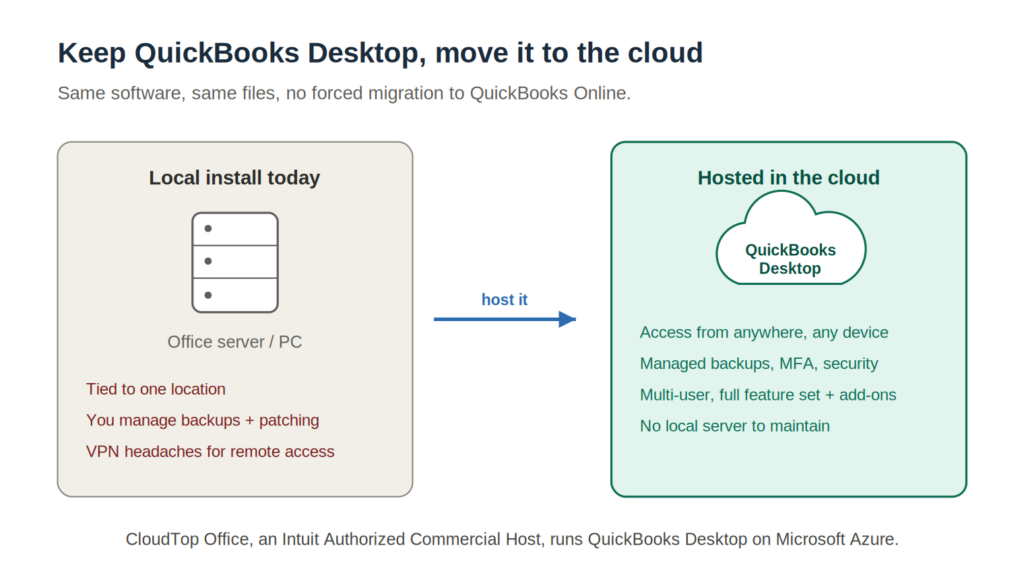
Hosted QuickBooks Desktop means your licensed Desktop software runs on a managed cloud server that you and your team access remotely, instead of being installed on a local machine. It is the same QuickBooks Desktop, the same screens, the same reports, and the same add-ons. What changes is where it runs and who maintains the environment around it.
That single change addresses the reasons people feel pushed off Desktop in the first place:
- Full Desktop feature set, intact. Inventory, job costing, industry-specific reports, and third-party add-ons all work the way they do today. Nothing to relearn.
- No forced migration. You keep the product and the file structure you already use. There is no rebuild of your chart of accounts or workflows around a different platform.
- Remote access from anywhere. Work from home, a client site, or a second office, on any device with a connection.
- Multi-user collaboration. Several people work in the same company file at once without a local server in a closet.
- Managed security and backups. A reputable host handles current patching, multi-factor authentication, encryption, and automated daily backups, which directly answers the security and compliance risks of running locally.
- No local server to babysit. No aging hardware, no VPN headaches, no manual backup routine.
A quick clarification, because it trips people up: hosting does not, by itself, extend Intuit’s support for an end-of-service version. Hosting and your QuickBooks version are separate things. The practical path most businesses take is to run a currently supported Desktop version (or Enterprise) in a hosted environment. That combination gives you a maintained version of the software plus the cloud benefits, which is the real “keep using Desktop” answer for the long term.
How to move QuickBooks Desktop to a hosted environment
Moving to hosting is more straightforward than a platform migration because you are not converting your data into a different product. At a high level, the process looks like this.
- Confirm your version and licenses. Check which QuickBooks Desktop version and edition you run (press F2 or Ctrl+1 in QuickBooks to see it) and gather your license details.
- Choose an authorized host. Work with an Intuit Authorized Commercial Host so your licensing is handled correctly and the environment is configured for QuickBooks specifically.
- Provision the cloud environment. The host sets up your secure server, installs QuickBooks and any add-ons, and configures user access.
- Move your company file. Your existing company file is transferred to the hosted server intact. No conversion, no reformatting.
- Connect your team. Each user installs a lightweight connection plugin and logs in. Day-to-day work looks the same as before, just reachable from anywhere.
CloudTop Office handles this kind of move regularly. As an Intuit Authorized Commercial Host, we run QuickBooks Desktop and Enterprise on Microsoft Azure in U.S. regions, support the third-party add-ons many firms depend on, and staff our help line with U.S.-based technicians who know the software, not just the servers. We have hosted accounting and sales applications for small and mid-sized businesses since 2000.
Frequently asked questions
Can I keep using QuickBooks Desktop after Intuit stops supporting it?
Yes. The software keeps running and your company files stay accessible after end of service. You lose the connected services, such as payroll updates, bank feeds, payments, security patches, and live support, but the program itself does not shut off.
Do I have to switch to QuickBooks Online?
No. QuickBooks Online is only one option. You can upgrade to a supported Desktop version, move to QuickBooks Enterprise, or host your Desktop software in the cloud to keep the full Desktop experience without migrating to a different product.
Does hosting QuickBooks Desktop extend Intuit’s support for an old version?
No. Hosting and your QuickBooks version are separate. Hosting does not extend Intuit’s end-of-service date for a given version. Most businesses run a currently supported Desktop version or Enterprise in a hosted environment, which gives them a maintained version plus cloud access.
Will my add-ons and reports still work if I host QuickBooks Desktop?
Yes. Hosting runs the same QuickBooks Desktop software, so your add-ons, integrations, custom reports, inventory, and job costing work as they do now. A host that supports third-party add-ons installs and configures them in your environment.
Is it safe to keep running an unsupported version of QuickBooks Desktop?
It carries growing risk. Once security updates stop, newly discovered vulnerabilities go unpatched. For firms handling client financial data, that runs against expectations under the FTC Safeguards Rule and IRS Publication 4557, so running unsupported software long-term is not advisable.
How hard is it to move QuickBooks Desktop to a hosted server?
It is simpler than a platform migration because your company file is not converted into a different product. An authorized host provisions the server, installs QuickBooks and your add-ons, transfers your file intact, and connects your users through a lightweight plugin.
The bottom line
You do not have to abandon QuickBooks Desktop because Intuit stopped supporting your version. The software keeps working, and a supported version run in a hosted environment lets you keep the full Desktop feature set, your add-ons, and your workflows while regaining remote access, collaboration, and managed security. No forced migration to a different product.
If you would rather keep the software you know than rebuild around something new, hosting is the path worth looking at. Get a personalized quote from CloudTop Office, or book a consultation with our U.S.-based team to talk through your version, your add-ons, and the right way to keep Desktop running.
Leave a Reply