

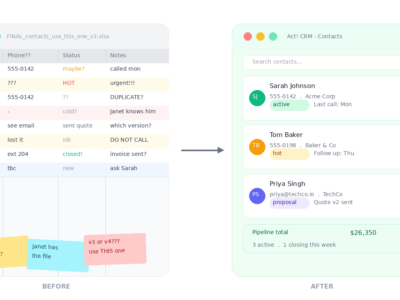
Somewhere on your computer right now, there is a spreadsheet. It has a name like “Clients Master List” or “Contacts 2024 UPDATED” or, if things have really gotten away from you, “FINAL_contacts_use_this_one_v3.” It was supposed to be temporary. That was a few years ago.
If this sounds familiar, you are not alone. Spreadsheets are where customer relationships go to get organized in theory and lost in practice. They’re the duct tape of small business operations: endlessly flexible, surprisingly durable, and quietly causing problems that you don’t notice until something falls apart.
This post is about what life looks like when you make the switch to Act! CRM, which is what CloudTop hosts for a lot of our customers. But first, let’s give the spreadsheet its fair hearing.
In defense of the spreadsheet (briefly)
Spreadsheets are free. Everyone knows how to use them. They don’t require training, onboarding, or a subscription. You can build one in twenty minutes and have something that technically works.
For a business just getting started with a handful of clients, they’re perfectly reasonable. There’s no shame in starting there. The shame, if there is any, is in staying there once the business has grown past the point where a spreadsheet can keep up.
And that moment comes earlier than most people expect.
Where spreadsheets start to break down
The first crack usually shows up around follow-ups. You have a list of contacts. You’ve had calls with some of them, sent emails to others, left voicemails that may or may not have been returned. None of that lives in the spreadsheet, because a spreadsheet has no way to store it cleanly. So it lives in your memory, or in your email inbox, or in a notes app on your phone, or nowhere.
The second crack is collaboration. The moment more than one person needs to work with the customer list, the spreadsheet starts creating problems. Who has the latest version? Did someone add that new client yet? Why does Janet’s copy have twelve contacts that aren’t in yours?
The third crack is visibility. A spreadsheet can tell you how many customers you have. It cannot tell you which ones are close to closing, which ones haven’t been touched in three months, which ones are worth prioritizing this week, or what the overall health of your pipeline actually looks like. You can try to build that in with formulas and color coding, and some people do, but at some point you’ve essentially built a worse version of software that already exists.
What Act! actually does
Act! has been around since 1987, which means it has been solving this exact problem since before most of its users started their businesses. It was built specifically for small and medium-sized businesses, which matters more than it sounds. A lot of CRM software is enterprise software with the price tag adjusted down. Act! was designed for the way smaller teams actually work, from day one.
At its core, Act! is a contact management system with a long memory. Every customer gets a full profile: contact details, call history, email threads, notes from meetings, documents you’ve shared with them, tasks outstanding, opportunities in progress. Everything in one place, attached to one record, visible to everyone on your team who needs to see it.
That last part is worth lingering on. When your whole team works out of the same system, “I didn’t know you’d already spoken to them” stops being a thing that happens. New team members can get up to speed on a client relationship in minutes just by reading the history. Nothing lives exclusively in one person’s head or one person’s inbox.
The pipeline piece
One of the most useful shifts that happens when businesses move from spreadsheets to Act! is that they suddenly have a real picture of their sales pipeline.
Instead of a flat list of contacts, you have a living view of where every opportunity stands: which deals are active, what stage they’re in, what the next action is, and when it’s due. Act! lets you build out your sales stages to match your actual process, so the pipeline reflects how your business sells rather than a generic template.
For a lot of small business owners, this is the moment where things start to feel genuinely different. They go from a vague sense of “we have some leads in the works” to a specific understanding of what’s actually happening and where attention is needed. That clarity has a direct effect on how and where time gets spent.
The follow-up problem, solved
Most small business sales don’t close because of a single brilliant pitch. They close because someone followed up consistently without being annoying about it. Spreadsheets make this hard. Act! makes it easy.
You can set tasks and reminders attached to specific contacts, so the system tells you when it’s time to reach out rather than relying on you to remember. You can schedule a call for three weeks from now and trust that it will show up on your calendar when it’s due, with the full contact history right there for context before you dial.
This sounds small. In practice, it’s the difference between a business that follows up reliably and one that means to.
Marketing without a separate tool
Act! also includes built-in email marketing and automation, which is worth mentioning because a lot of small businesses are paying for a CRM and a separate email marketing tool when one platform covers both.
You can build email campaigns, create landing pages, send newsletters, and track who opened what, all from inside Act!. The automation side means you can set up sequences that run on their own: a welcome email when a new contact is added, a follow-up series after a quote goes out, a check-in after a certain number of days of silence.
For a small team that doesn’t have dedicated marketing staff, this kind of automation punches well above its weight.
How CloudTop fits in
We host Act! for businesses across the US, which means you get the full desktop version of Act! running in the cloud, accessible from any device, without any of the local installation headaches that used to come with it.
The advantage of the desktop version over the browser-only version is depth. The desktop Act! is the fully-featured platform, with all the customization options, integration capabilities, and performance that power users rely on. And because it runs on our hosted environment, it works seamlessly alongside QuickBooks, QuoteWerks, and Sage if you use those too. Everything in one place, one login, one consistent experience whether you’re in the office or working remotely.
A realistic transition
Switching from a spreadsheet to a CRM sounds like a bigger project than it usually is. Act! has a solid onboarding process, and the learning curve for basic use is gentler than most people expect. The contact import from a spreadsheet is straightforward, and the payoff starts showing up pretty quickly once the team is in the habit of using it.
The businesses that get the most out of Act! are the ones where everyone commits to putting information in. A CRM is only as useful as what goes into it, which is true of spreadsheets too, except that Act! makes it much easier to capture the things that spreadsheets can’t: the calls, the notes, the history, the follow-ups, the full picture of a customer relationship over time.
The bottom line
A spreadsheet is a fine place to start. It is not a great place to stay. If your customer list has outgrown the tool you’re using to manage it, Act! is worth a serious look, especially if you’re already running QuickBooks or QuoteWerks and want everything working together in one environment.
The goal isn’t software for its own sake. It’s knowing where every customer relationship stands, without having to piece it together from three different places every time you need the answer.
CloudTop Office hosts Act!, QuickBooks, QuoteWerks, and Sage for small and medium-sized businesses across the US. If you want to see what a hosted Act! setup looks like for your team, give us a call at (713) 662-3994 or reach out through our website. We’re happy to walk you through it.
Leave a Reply